
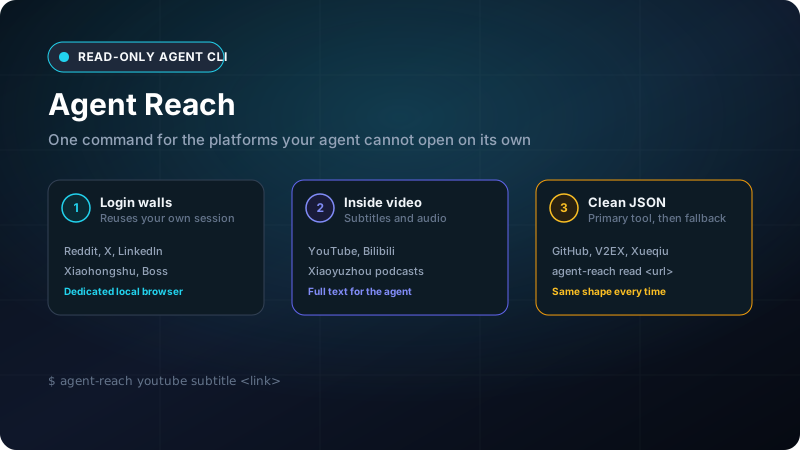
Agent Reach: give your coding agent the parts of the internet it cannot open
Claude Code, Codex and similar CLI agents ship with web search and page fetching. That covers public articles well. It fails on pages behind a login, on what is said inside a video, and on Chinese platforms that general search barely indexes. Ask an agent to read a Reddit thread, pull a YouTube transcript or check a V2EX discussion and you usually get a blocked page or a guess.
Agent Reach fills that gap. It is an MIT-licensed Python CLI by Panniantong (108k+ GitHub stars, version 1.6.1 when I tested it). It installs and wires up the upstream tools for each platform, then exposes them all as agent-reach <channel> <action>. Every command prints JSON, so the agent never has to scrape or parse HTML.
This kit covers which platforms work out of the box, how a request is routed, and what a real run looks like on a Windows machine.
1. Channels and what each one needs
Agent Reach groups platforms into channels with three levels: default works right after install, optional turns on when you ask, and experimental can break whenever the platform tightens anti-bot rules.
| Channel | Level | Actions | Needs |
|---|---|---|---|
github |
default | search repos, read repo and README, read issues and PRs with comments | nothing |
youtube |
default | video info, search, subtitles, speech-to-text | nothing; speech-to-text needs a Groq or OpenAI key |
web |
default | web search, page reading | nothing |
v2ex |
default | hot topics, nodes, topics with replies, users | nothing |
bilibili |
default | search, video info, trending, subtitles | nothing; subtitles need a QR login |
reddit, linkedin, xiaohongshu, boss, xueqiu |
optional | search and read posts, jobs or quotes | a login for most actions |
xiaoyuzhou |
optional | podcast transcription | Groq key |
twitter, facebook, instagram |
experimental | search, profiles, posts | login |
Run agent-reach channels to list every channel with its actions and parameters. The agent can read that output and pick the right command without a manual.
2. How a request is routed
Each action on each platform has an ordered list of tools. Agent Reach tries the first, and if it fails it moves to the next. Reading a Bilibili video tries bili-cli, then Bilibili's public API. Reading a web page tries Jina Reader, then Exa.
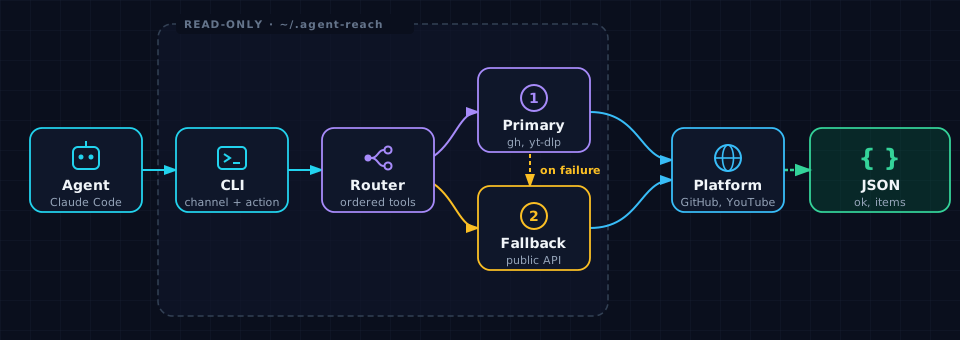
- Agent to CLI. The agent runs one shell command, for example
agent-reach github read owner/repo. - Router. It picks the channel from the command, or from the URL when you use
agent-reach read <url>. - Primary, then fallback. A broken upstream tool only reorders that list. The way the agent calls Agent Reach does not change.
- JSON back. Each result has
ok,channel,action,backendand a list ofitems, so you can see which tool answered.
A real run
I ran the commands below in PowerShell on Windows with the default channels. The screenshot shows the full, unedited output. doctor reads local state only and makes no network calls, so most channels show unverified. github shows ready because I had run agent-reach check github first. Run agent-reach check <channel> to test one live.
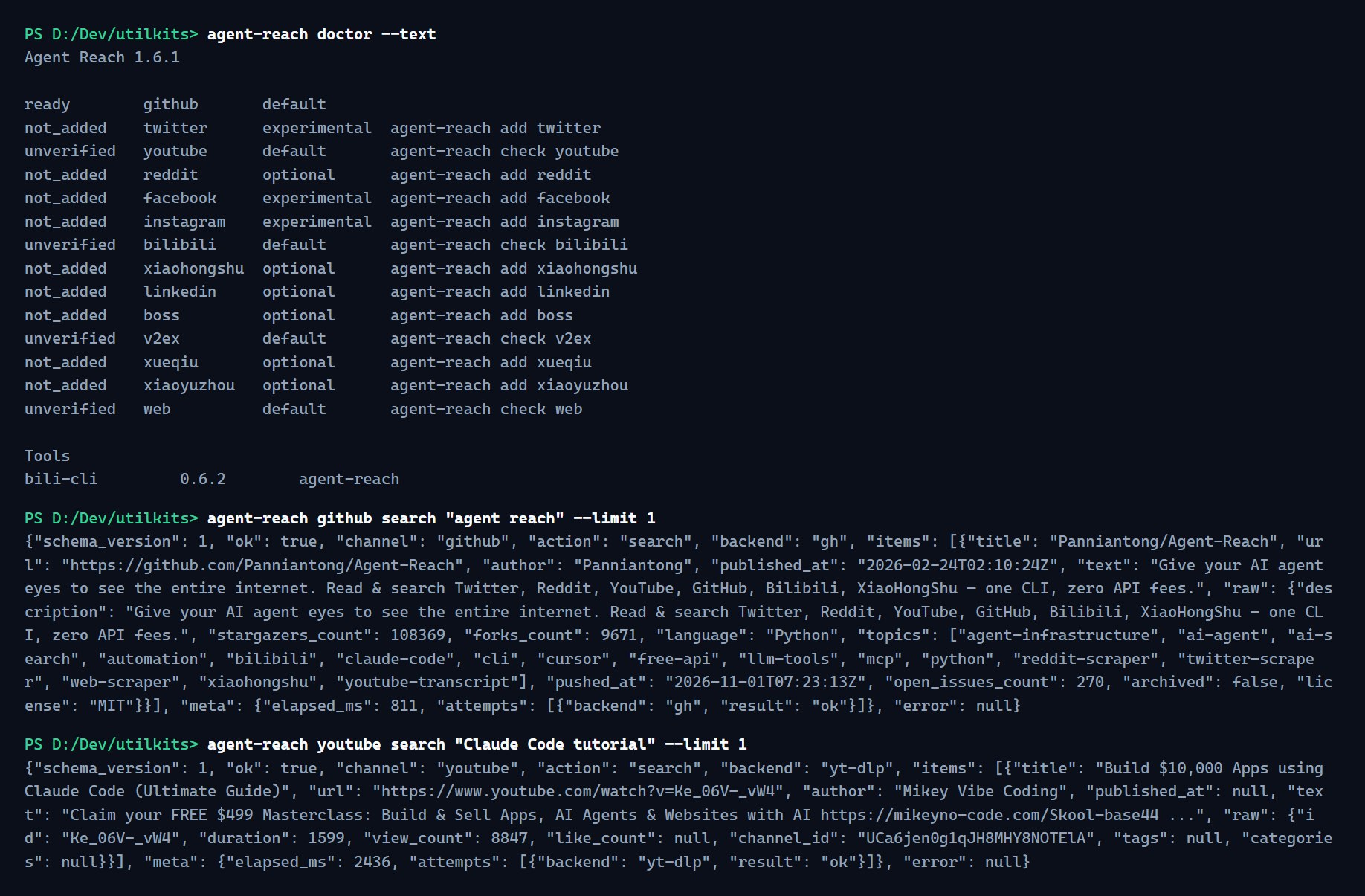
Other commands that worked on the same machine: github search, github read, web read, youtube subtitle and bilibili hot. The youtube subtitle call returned the full caption text of a Claude Code tutorial (about 8,300 words) in one response, something a normal fetch tool cannot do.
3. Safety and access
Agent Reach is read-only. It searches and reads, and it does not post, comment, like or send messages.
- Logins. It never logs in for you and never asks for a password. For channels that need one, it uses its own background browser and copies the login for that one site from your Chrome. Your Chrome profile stays unchanged and the password store is not read.
- Use a secondary account. The copied login is usually your main account, and platforms may restrict accounts that automate access. The README recommends a spare account.
- One folder. Tools, logins and settings live under
~/.agent-reach/, so removal is one command:agent-reach uninstall --dry-runlists what would go. - Local browser only. The dedicated browser accepts connections from your own machine.
[!IMPORTANT] The
agent-reachpackage on PyPI is not this project. Install only from the GitHub URL ininstall.md.
4. Install and first commands
Let your agent install it
The README's supported path is to hand your agent the install guide. Paste this into Claude Code or any agent that can run commands:
Install Agent Reach: https://raw.githubusercontent.com/Panniantong/Agent-Reach/main/docs/install.md
The agent installs uv if it is missing, sets up the default channels and tells you what works. Read install.md once before you approve the commands.
Check the install
agent-reach doctor --text
agent-reach check github
First commands
agent-reach channels
agent-reach github search "agent reach" --limit 2
agent-reach youtube subtitle "https://www.youtube.com/watch?v=<id>" --lang en
agent-reach read https://www.v2ex.com/t/1253999
Add and remove channels
Tell your agent "add Reddit" or run agent-reach add reddit. Then run agent-reach login reddit and sign in yourself in the window that opens. agent-reach remove reddit clears the channel, its login and its private tools.
Keep it current
agent-reach update --check
agent-reach update