
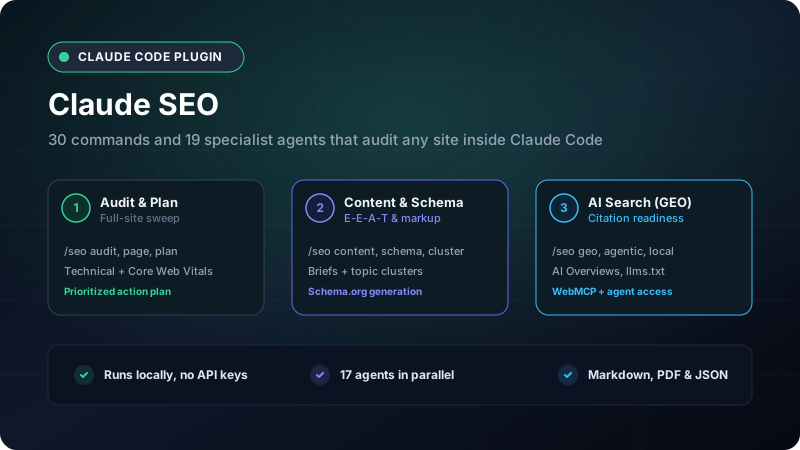
Claude SEO: Run a full SEO audit from inside Claude Code
A proper SEO audit usually means booking an agency for a few weeks, or paying for a dashboard tool and still spending hours reading its warnings. If you already work in Claude Code, you have a capable agent sitting in the terminal, but it does not know what a canonical tag, an llms.txt file, or an AI Overview citation requires.
Claude SEO handles that part. It is an MIT-licensed plugin by Agrici Daniel that installs 26 sub-skills, 19 specialist agents, and 30 commands into Claude Code. Give it a URL and it runs a full audit, then returns a prioritized action plan instead of a wall of red flags.
This kit focuses on the practical side: which command to run for which job, what each one produces, and how the agents coordinate behind the scenes.
1. The command map
The plugin organizes 30 commands into six groups. Most daily work starts with one audit command, then narrows into a group:
| Group | Commands | What you get |
|---|---|---|
| Audits and planning | /seo setup, /seo doctor, /seo audit, /seo page, /seo plan |
Runtime setup, full-site sweep, single-page deep dive, strategy by business type |
| Technical SEO | /seo technical, /seo sitemap, /seo images, /seo hreflang, /seo programmatic, /seo google, /seo drift |
Crawl and index fixes, sitemaps, i18n, Google APIs, change tracking |
| Content and E-E-A-T | /seo content, /seo content-brief, /seo cluster, /seo sxo, /seo flow, /seo competitor-pages |
Quality reviews, briefs, keyword clusters, search-experience personas |
| Schema and AI search | /seo schema, /seo geo, /seo agentic |
Schema.org generation, AI Overview readiness, agent access and llms.txt |
| Local and commerce | /seo local, /seo maps, /seo backlinks, /seo ecommerce |
Google Business Profile, map pack, link profile, product pages |
| Extensions | /seo image-gen, /seo seranking, /seo profound, /seo bing, /seo unlighthouse |
Optional paid or external data sources |
Run /seo with no argument at any time to see the full list inside the terminal.
The 19 agents each own one narrow area: technical lead, content editor, schema engineer, sitemap architect, performance engineer, AI search analyst, local specialist, backlink analyst, e-commerce specialist, and so on. Five of them use Opus for judgment-heavy work and the rest run on Sonnet, so a single-page check costs far less than a full audit.
2. How an audit runs
The workflow runs in three steps: one command, a fan-out of agents, then a ranked plan.
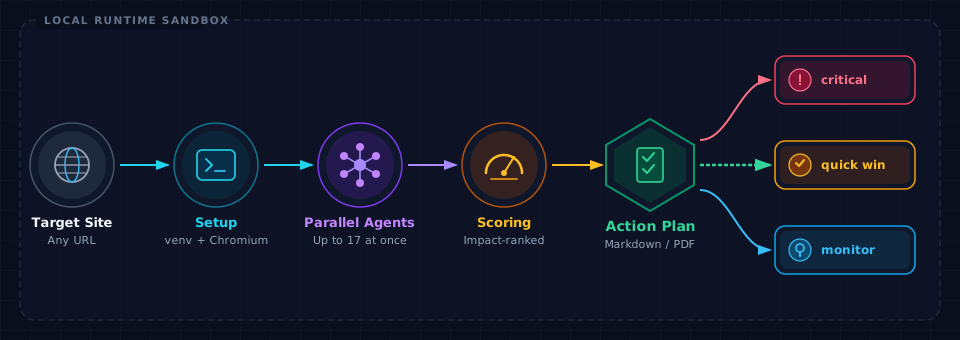
After you run /seo audit https://example.com:
- Detects the site type. The plugin decides whether it is looking at a SaaS product, a local business, an e-commerce store, a publisher, or an agency, and adjusts which checks matter.
- Fans out the team. Up to 17 agents run at once: technical, content, schema, performance, visual QA, AI search, and the rest. Each one inspects only its own slice, so they do not duplicate work.
- Scores before it reports. It grades findings by impact and dependency instead of dumping them in crawl order. Each recommendation states what it is based on and how to verify the fix worked.
- Writes files you keep. Results land as Markdown, JSON, and on request a PDF, all on your machine.
A real run on this site
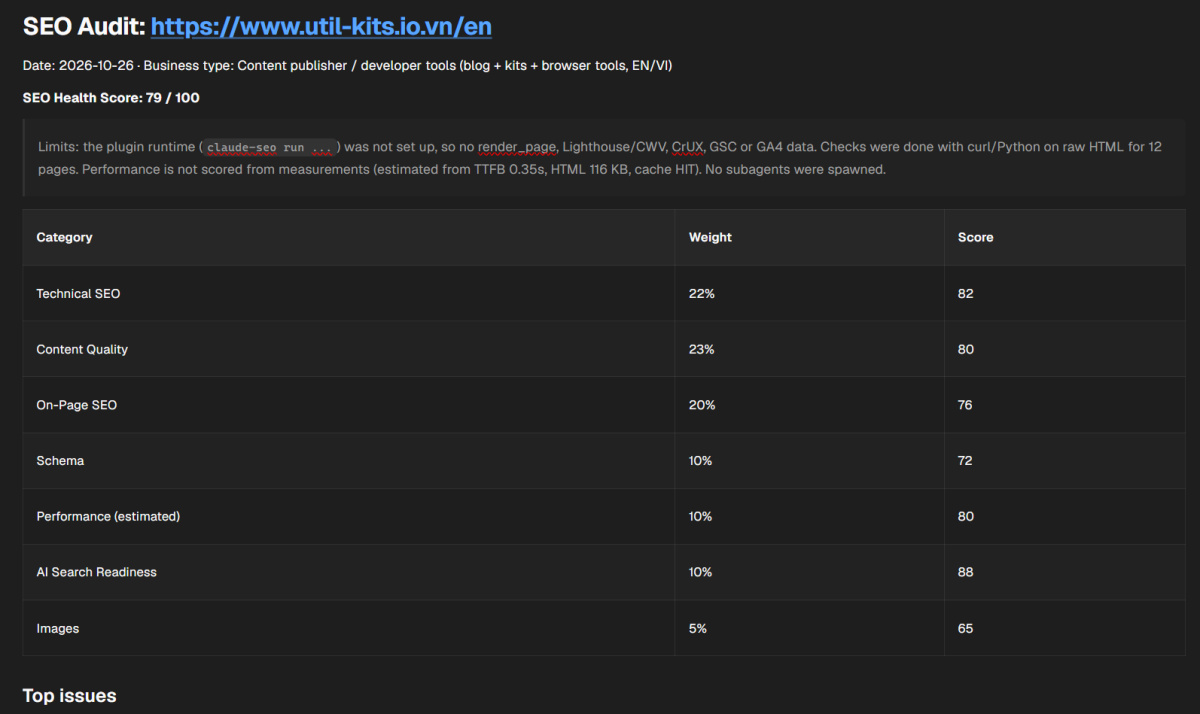
The screenshot below comes from running /seo audit https://www.util-kits.io.vn/en on this site. It scored 79/100 across seven weighted categories, and it says plainly that the plugin runtime was not set up, so the checks came from raw HTML instead of a headless browser.
3. Use-case playbook
The command list is long, but most jobs start from one clear command.
Freelancer on a first client call
Run /seo audit https://client-site.com before the pitch. You get a real score and the top fixes in 10 to 15 minutes, which is a stronger opening than a template proposal. Follow with /seo page https://client-site.com/pricing when one page needs a deeper read.
Agency running recurring audits
Start with /seo drift baseline https://client-site.com, then run /seo drift compare on a schedule. The plugin stores SQLite snapshots so you can see what changed between audits instead of re-reading the same report every month.
Ranking in AI answers
Use /seo geo https://example.com to score how quotable your pages are for Google AI Overviews, ChatGPT, Perplexity, and Gemini. Pair it with /seo agentic to check whether AI crawlers can reach the site, whether llms.txt and Markdown versions exist, and how well agents can browse it.
Site migration or international launch
Run /seo technical for the nine-category technical sweep, /seo sitemap generate for the new structure, and /seo hreflang before you switch locales. This sequence catches redirect chains and broken hreflang pairs before they cost you rankings.
Content planning
/seo content https://example.com/blog/post checks E-E-A-T and thin sections. /seo cluster "your keyword" groups the SERP into topics, and /seo content-brief "topic" turns that into an outline with target keywords and internal links.
Local business or online store
/seo local covers Google Business Profile, citations, reviews, and the map pack. /seo ecommerce adds product pages, marketplace structure, and category duplication. If maps matter, /seo maps runs a geo-grid and review audit.
Reporting to stakeholders
/seo google report converts a run into a polished PDF. Connect free Google APIs with /seo google setup first if you want real Search Console and CrUX numbers instead of lab estimates.
4. Runtime, data, and cost
The plugin keeps its own Python environment and a headless Chromium. /seo setup installs both into an isolated location, so they do not touch the rest of your system. /seo doctor checks that the runtime is healthy before you spend tokens on a broken audit.
No API keys are required. Free Google APIs (PageSpeed Insights, CrUX, Search Console, GA4) are optional, and your keys stay on your machine. The extension commands are the only parts that reach paid services, and each one uses an account you bring yourself.
Claude processes the pages you audit, the same as anything else you open in Claude Code. Reports stay as local files, but the page content still passes through the model.
5. Install and first run
Plugin install (recommended)
Inside Claude Code 1.0.33 or newer:
/plugin marketplace add AgriciDaniel/claude-seo
/plugin install claude-seo@agricidaniel-claude-seo
/seo setup
Manual install on Windows
git clone --depth 1 https://github.com/AgriciDaniel/claude-seo.git
powershell -ExecutionPolicy Bypass -File claude-seo\install.ps1
[!IMPORTANT] The README recommends cloning instead of piping a remote script into your shell. Claude Code's own guardrails treat
irm ... | iexas a supply chain risk, so inspectinstall.ps1before running it.
Your first commands
/seo audit https://example.com      # full site, prioritized plan
/seo page https://example.com/pricing   # one page, in depth
/seo geo https://example.com        # AI search readiness
/seo schema https://example.com     # validate and generate structured data
What you get back
- A Markdown report with scored findings grouped by severity.
- JSON output so you can track changes over time.
- A PDF via
/seo google reportwhen you need something to send. - Concrete fixes, each with a way to confirm it worked.