
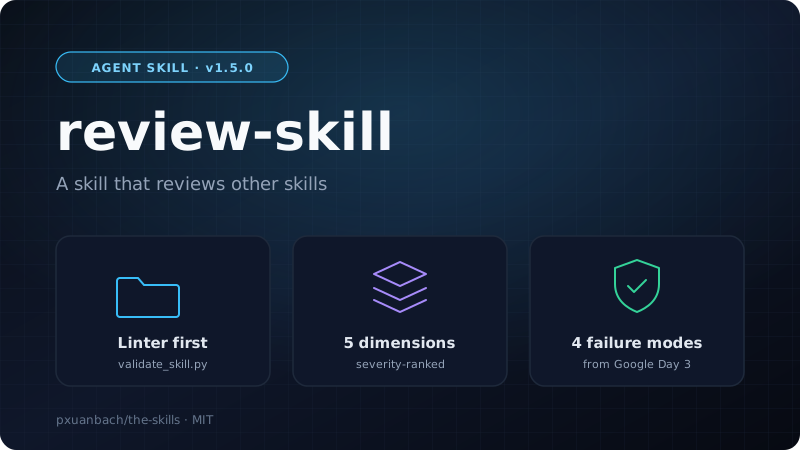
Review Skill: A Skill That Reviews Other Skills
I write a lot of skills, and for a long time my only test was "it seems to work". Then I read Day 3 of Google's "5-Day AI Agents" course, which is about Agent Skills. It cites SkillsBench: of 84 real-world agent tasks, 19% did worse with a skill than without one. A badly written skill is not neutral. It makes the agent worse.
Day 3 also holds a lot of concrete guidance: how to write a description, how big a skill may get, which smells to watch for, how to evaluate and ship. I did not want to re-read it before every new skill, so I turned it into review-skill (MIT, v1.5.0), part of my the-skills repository. Point it at any skill folder and an agent reviews it against the whitepaper's rules.
1. What It Checks
A review has two layers. A Python linter handles what a script can decide. The agent judges the rest across five dimensions, each taken from a Day 3 section.
| Dimension | What the reviewer looks for | Day 3 source |
|---|---|---|
| Metadata & routing | name in kebab-case, SemVer version, description that says what it does, when to use it and when not to, within 1024 characters |
"The description is the routing algorithm" |
| Progressive disclosure | SKILL.md under 5,000 words, deterministic work in scripts/, deep context in references/, templates in assets/ |
Three-level loading |
| Instruction clarity | Imperative steps, a reason behind each strict rule, concrete output formats, edge cases covered | "Give the reason, not just the rule" |
| Script & tool hygiene | Documented scripts, no secrets, no absolute paths, no vendor-locked tool names | Don'ts list |
| Testability | Trigger, execution, regression and token-budget coverage | Section 4, four failure modes |
An optional sixth pass reads the skill the way the executing model would. It flags passages that can be read two ways, terms defined nowhere, and the same rule stated in two places.
The linter validate_skill.py covers the mechanical part: missing or malformed frontmatter, a description that opens with "a helpful skill for", a body over 5,000 words, ALWAYS or NEVER with no nearby explanation, hardcoded secrets, absolute paths, empty folders, scripts with no usage comment and unpinned dependencies. It exits 0 when clean and 1 on any error, and --json gives machine-readable output.
2. Review Workflow
I fixed the order: deterministic checks first, judgment second, evidence on every finding.
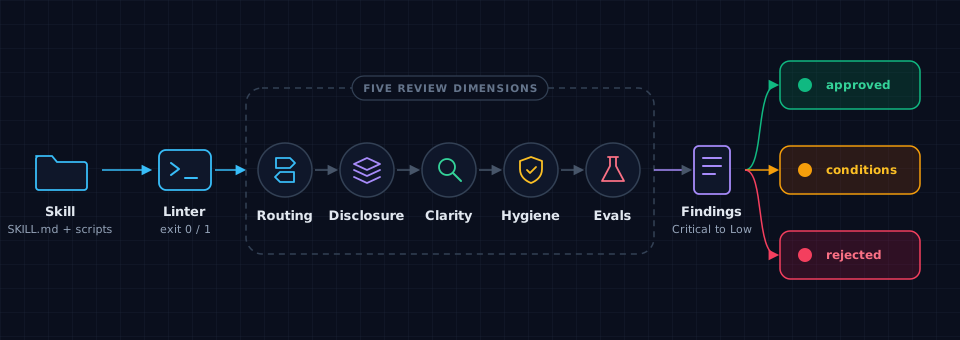
- Linter first. Its output goes into the report under Mechanical Checks. A skill with linter errors is not done.
- Scope. The reviewer lists what exists:
SKILL.md, frontmatter, and anyreferences/,scripts/,assets/orexamples/. - Five dimensions. Each gets Pass, Needs Improvement or Fail.
- Severity-ranked findings. Every finding carries a file and line, a severity (Critical, High, Medium or Low) and a concrete fix. The verdict is APPROVED, APPROVED WITH CONDITIONS or REJECTED.
3. Design Decisions
Each decision below comes straight from something Day 3 argues for.
Cheap check before expensive check. Day 3 says repeated deterministic work belongs in scripts/. So the linter runs first, and the agent's tokens go to questions a regex cannot answer, such as whether a description is vague.
The "give the reason" rule lives in code. Day 3 says that if you catch yourself typing "ALWAYS" or "NEVER" in caps, explain the rationale instead. The linter finds each such word outside code spans and looks about 150 characters either side for words like "because" or "since". If it finds none, it reports an error and suggests moving the rule to AGENTS.md. It is a crude heuristic, but it catches the most common failure at no cost.
Testability follows the four failure modes. The skill spells out Day 3's trigger, execution, regression and token-budget failures. I kept the whitepaper's gate too: a skill missing any one stays at draft tier, however well the happy path works.
Skill smells are built in. I copied Day 3's six anti-patterns: over 5,000 words, two teams could own it, you cannot write three test cases, it references nothing else, it keeps growing edge-case sections, and its description starts with "a helpful skill for". The reviewer can name the smell instead of saying "this feels off".
Findings need evidence. A finding without a file, line, severity and fix is not a finding. That makes a report easy to turn into a task list.
The skill follows its own rules. The whole SKILL.md is about 1,700 words, with the linter in scripts/. Run against itself, the linter passes. It also bans hardcoded tool names and paths, so it works across agents, as Day 3's "the runtime is interchangeable" asks.
It ends with a deployment gate. Seven checkboxes from Day 3's deployment checklist: lint, a second reader for the description, script tests in CI, an eval suite with a threshold, a security scan, cross-tool install tests and org provisioning.
[!NOTE] What it does not do yet: the linter checks structure, not behavior. It cannot measure trigger accuracy or regressions, so those stay as checklist items you run yourself. I also have not added eval cases for review-skill itself.
4. Installation & Quickstart
Interactive Installer
One command opens a menu where you pick the coding agents and the skills to install. No git clone needed.
# Windows (PowerShell)
irm https://raw.githubusercontent.com/pxuanbach/the-skills/main/install.ps1 | iex
# macOS / Linux
curl -fsSL https://raw.githubusercontent.com/pxuanbach/the-skills/main/install.sh | bash
Install Only review-skill
Pass flags to skip the menu:
curl -fsSL https://raw.githubusercontent.com/pxuanbach/the-skills/main/install.sh | bash -s -- --targets claude --skills review-skill
--targets accepts pi, claude, antigravity, codex, opencode, common or all. --skills takes a comma-separated list or all. The PowerShell script uses -Targets and -Skills the same way.
| Agent | Install path |
|---|---|
| Pi Agent | ~/.pi/agent/skills |
| Claude Code | ~/.claude/skills |
| Antigravity / Gemini CLI | ~/.gemini/config/skills |
| OpenAI Codex CLI | ~/.codex/skills |
| OpenCode | ~/.config/opencode/skills |
Run the Linter Alone
python ~/.claude/skills/review-skill/scripts/validate_skill.py path/to/your-skill
[!IMPORTANT] Point the review at one skill folder. Reviewing a parent directory mixes unrelated skills into one report.
Execution Prompt
Review the skill in ./skills/my-skill. Run the linter first, then assess all five dimensions and give me a severity-ranked report.
Expected Output
A report titled "Skill Review Report" with an executive summary, five dimension ratings, findings grouped by severity with file and line references, and a prioritized fix checklist.