From Chatbot to Agentic AI: What Actually Changes & How to Use It Daily
Understanding the shift from Chatbot to Agentic AI, along with a 4-step framework and the GCCA formula to turn AI into an effective daily partner.
Agentic AI differs from a chatbot because it works toward a goal across steps instead of answering one prompt at a time. GCCA, short for Goal, Context, Constraints, and Acceptance Criteria, is the formula for handing the AI a task it can plan and finish on its own.
Most of us still use AI in a familiar routine: open a chat window, type a long prompt, wait for an answer, and manually copy-paste it into our work. When something breaks, we paste the error back into chat and ask again.
This workflow turns you into a manual go-between, while the AI acts as a passive search box.
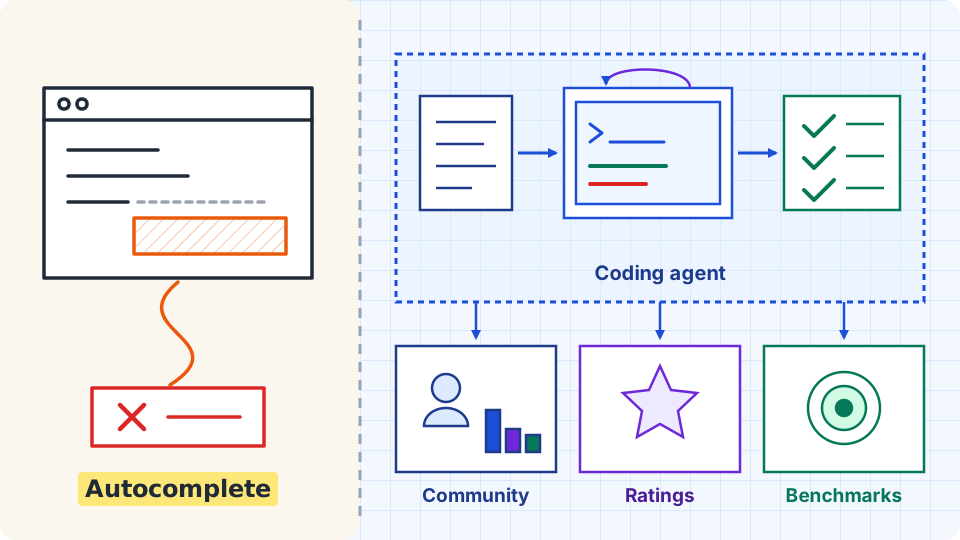
Agentic AI changes that approach: instead of exchanging single-turn questions and answers, you define a goal and let the AI plan and execute the necessary actions to deliver the result.
1. Chatbot vs. Agentic AI: The Core Difference

The key distinction lies in the execution mechanism (Execution Loop), independent of model parameter count:
| Dimension | Traditional Chatbot | Agentic AI System |
|---|---|---|
| Interaction Model | Passive (Prompt-driven): Answers one prompt per computation pass. | Autonomous (Goal-driven): Takes a broader goal, decomposes it, and executes steps independently. |
| Execution Flow | Linear: Prompt in → Text out → Stops. | Autonomous Loop (ReAct): Plan → Act → Observe results → Self-correct. |
| Environment | Outputs text on a chat screen. | Tool Use: Reads and edits actual files, queries databases, calls APIs, runs commands. |
| Error Handling | Relies on the human to spot mistakes and re-prompt. | Reflection: Inspects error logs, diagnoses root causes, and retries alternative approaches. |
| Your Role | Manual prompt typer and copy-paster. | Directs goals and reviews deliverables. |
2. A 4-Step Framework to Integrate Agentic AI into Daily Work
This framework applies across marketing, data analysis, project management, and software engineering:
Step 1: Context Anchoring
For an agent to work accurately without re-explaining the context in every prompt, provide two clear layers:
- Static Context (Rules & Standards): Document your working style, brand tone, or technical standards in a dedicated reference file in your workspace (such as
AGENTS.mdorGUIDELINES.md). The agent reads this file first to understand the rules before acting. In software projects, this forms the basis of harness engineering in the AI SDLC to prevent hallucinations and maintain architecture constraints. - Dynamic Context (Operating Environment):
- Workspace Files: Allow the agent to directly inspect existing documents, reports, or source code.
- Real Data: Connect the agent to your database to query actual figures instead of hallucinating numbers.
- External Tools: Integrate with apps like Notion, Slack, or Google Drive via open standards like the Model Context Protocol (MCP).
Step 2: Safe Delegation via a 3-Tier Autonomy Matrix
Never grant unrestricted autonomy on day one. Divide tasks into three distinct risk tiers:
- Tier 1 - Research & Ingestion (Read-Only): Let the agent freely search the web, review documents, and cross-reference spreadsheet figures. This tier is completely safe because no data is modified.
- Tier 3 - Drafting & Planning (Propose): The agent drafts emails, outlines campaigns, compiles reports, or sketches solutions. You act as the reviewer: checking and approving before anything moves forward.
- Tier 3 - Direct Execution (Execute): Actions with external consequences—sending client emails, updating live databases, publishing posts, or changing production systems. This tier must always require explicit human confirmation (Human-in-the-loop).
Step 3: Plan First, Act Later
For multi-step assignments, never let an agent rush straight into execution. Require a quick checkpoint first:
"Before executing, outline your planned steps and acceptance criteria for my approval."
Reviewing an outline takes one minute, but prevents hours of cleaning up a deliverable that completely missed the mark.
Step 4: Knowledge Compounding
Whenever you correct or refine an agent's output, do not let that lesson vanish when the chat session ends. Immediately record it in your project guidelines:
- Marketing: Add phrases, tone issues, or clichés to avoid.
- Business & Analytics: Clarify precise KPI calculation formulas and definitions.
- Engineering: Note preferred libraries, architectural rules, or mandatory test scenarios.
Within a few weeks, the agent accumulates your personal standards and working style, becoming a truly aligned teammate.
3. The GCCA Formula: Clear and Natural Delegation
Delegating to Agentic AI is like briefing an experienced colleague: you need a goal, context, constraints, and acceptance criteria. This mirrors the modern 4-part prompt architecture used for single-turn model requests, but extends it into an ongoing execution loop.
GCCA = Goal + Context + Constraints + Acceptance Criteria
- Goal: The specific outcome you need to achieve.
- Context: Documents, datasets, or systems to reference.
- Constraints: Clear boundaries and what must not be done.
- Acceptance Criteria: Clear conditions that confirm the task is complete.
Real-World Comparison:
| Field | Old Prompt Style (Vague) | GCCA Delegation (Clear & Grounded) |
|---|---|---|
| Marketing | "Write 3 welcome emails for new users." | "Create a 3-part onboarding email sequence for trial signups. Context: Review customer persona in /docs/persona.md. Constraints: No direct discounts; keep the tone warm yet professional. Acceptance Criteria: Present outline of core messages for each email for my approval before drafting." |
| Business & Data | "Look at this quarter's financial report and find any issues." | "Analyze operational expense variances in Q3_expenses.xlsx. Context: Compare against Q2 figures and initial budget plans. Constraints: Highlight variances over 15% only; avoid speculation without supporting numbers. Acceptance Criteria: Provide summary table of top 5 cost drivers with visual charts." |
| Engineering | "Write a function to upload avatars to S3 in TypeScript." | "Add avatar upload to S3. Context: Follow error-handling patterns in app/api/upload. Constraints: Only accept .jpg, .png under 5MB via presigned URLs. Acceptance Criteria: Add unit tests and ensure all tests pass before handoff." |
4. 3 Common Pitfalls to Avoid

- The Zero-Constraint Trap: Giving vague instructions without guardrails invites the agent to make assumptions and change things outside your intent. Always define what is off-limits.
- Blind Trust: Never allow an agent to send external communications or alter critical records without your explicit approval. To see what blind trust costs in practice, read why AI makes things up and four real cases.
- The Infinite Loop: If you notice an agent repeating a failed action more than 3 times, pause the task, intervene, and provide a direct pointer to set it back on track.
Agentic AI delivers the highest value when handling repetitive action sequences, freeing you to focus on strategic decisions. The simplest way to start is creating a basic context guidelines file in your workspace and applying the GCCA formula to your very next task.