ElevenLabs Step by Step: Voiceover, Sound Effects, Dubbing and a Voice Agent
A hands-on ElevenLabs tutorial built around six real jobs, from narrating a video to a receptionist voice agent, with dashboard screenshots, credit costs and the limits of the free plan.
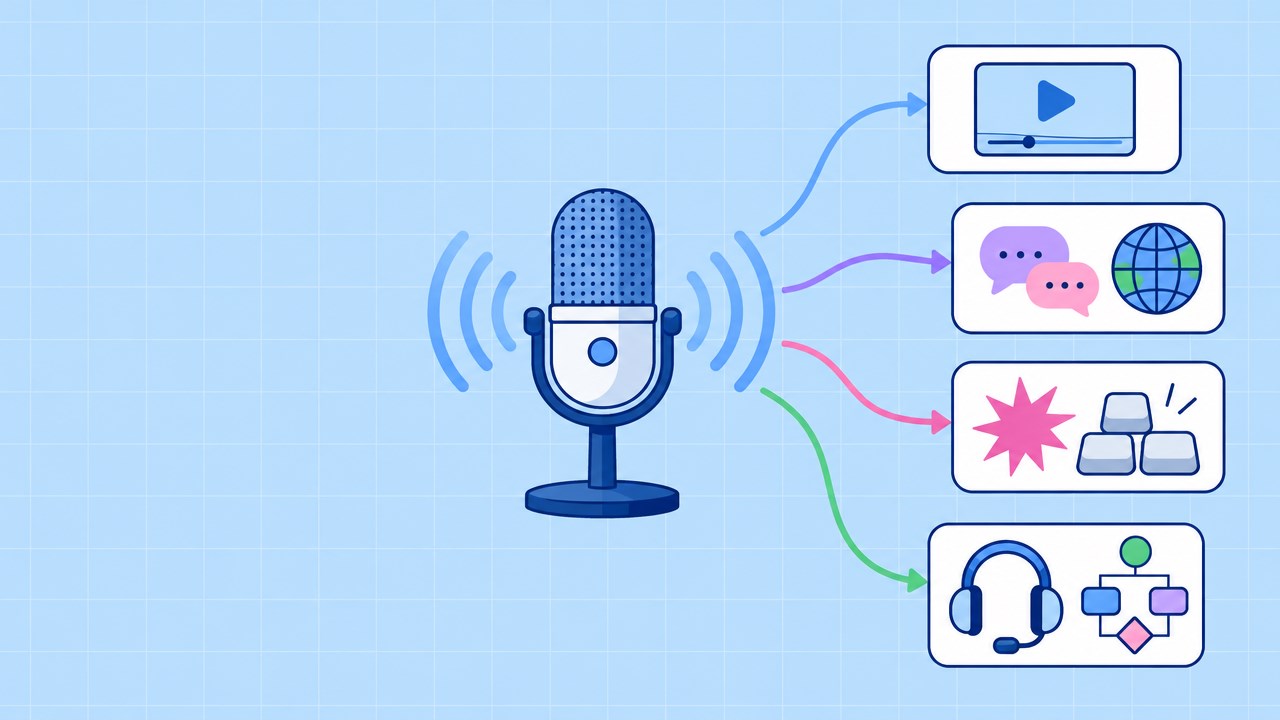
ElevenLabs is an AI voice platform. It turns text into speech, audio into text, and a short written description into sound effects, music or a brand-new voice. This guide shows how to use each part in the current dashboard, what the free plan's 10,000 credits cover, and where the limits are.
I ran the text-to-speech, sound-effects and voice-design flows on a free account, and opened the dubbing, transcription, music and agent screens up to the point where credits would be spent. All screenshots come from the dashboard on 2026-10-21, and each section says where I stopped.
The dashboard sidebar lists Voices, Studio, Flows, Chat and Assets, then pinned tools such as Text to Speech, Voice Creation, Sound Effects, Music and Speech to Text, and a More tools menu. Agents is a separate platform opened with the platform switcher. This table maps a goal to a section:
| If you want to | Read the section |
|---|---|
| Read a script aloud | Turn text into a voiceover |
| Get a transcript or subtitles | Turn audio or video into a transcript |
| Narrate a long script or assemble a video | Narrate a long script or assemble a video (Studio) |
| Add a short sound under a clip | Generate sound effects |
| Add music to an intro | Generate background music |
| Have a consistent narrator voice | Create or clone a voice |
| Publish a video in a second language | Dub a video |
| Answer calls and messages | Build a voice agent |
| Know the price and license first | Free plan, pricing and models; Commercial use |
If you already use AI tools in a daily routine, the agentic daily workflow guide covers where a voice layer fits next to chat and coding assistants.
Free plan, pricing and models: what you get before you pay
The partner material for ElevenLabs still describes Eleven v3 as the flagship model with 70+ languages. The current dashboard differs. On 2026-10-21 the Text to Speech page defaults to Eleven v4, described in the model picker as "our fastest and most emotive model" with support for 90+ languages. ElevenLabs published the v4 announcement on September 28, 2026, and v3 is still selectable as the previous generation.
| Model | Languages | Characters per generation | Audio tags | Use it for |
|---|---|---|---|---|
| Eleven v4 | 90+ | 10,000 | Yes | Default for expressive voiceover |
| Eleven v3 | 70+ | 5,000 | Yes | Older projects you want to reproduce |
| Multilingual v2 | 29 | 10,000 | No | Long, stable narration in supported languages |
| Flash v2.5 | 32 | 40,000 | No | Fast, cheaper generation |
Language coverage differs by model, so check yours before choosing. Vietnamese, for example, is in v4, v3 and Flash v2.5 but not in Multilingual v2, which makes that model the wrong pick for a Vietnamese script.
The free plan gives 10,000 credits. The paid ladder from the pricing page looks like this:
| Plan | Price per month | Credits |
|---|---|---|
| Free | $0 | 10,000 |
| Starter | $6 | 30,000 |
| Creator | $22 | 121,000 |
| Pro | $99 | 600,000 |
Credit prices I saw inside the dashboard while working through the tasks below:
- Sound effect generation: 200 credits (automatic duration)
- Music: 1,800 credits for two one-minute tracks
- Voice Design: a price shown on the Generate button, 171 credits on my first look
- Dubbing, per the pricing page: 2,000 credits per source minute per target language with a watermark, 3,000 without
Ten thousand credits covers five minutes of watermarked dubbing, so choose your experiments before you spend any.
Turn text into a voiceover (Text to Speech)
Goal: turn a written script into a voiceover for a tutorial or short.
- Open Text to Speech from the pinned list in the sidebar.
- Paste or type the script into the main text area. The counter at the bottom shows characters used (mine read 149 / 10,000).
- Pick a voice in the Voice panel. The dashboard also lists a few voices under "Recommended for your text", which is a quick way to audition.
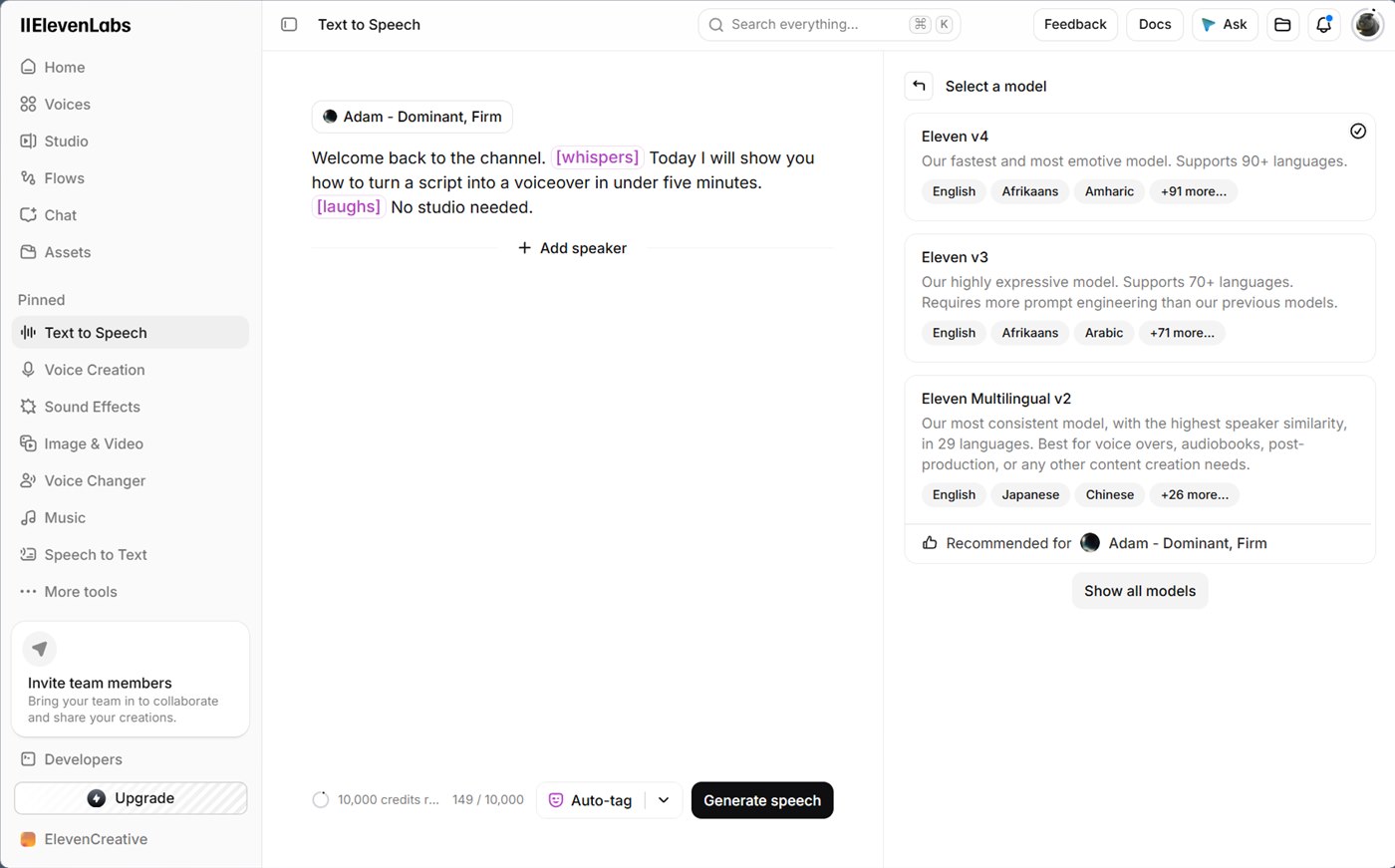
- Check the Model row. v4 is preselected, and the picker explains each option.
- Optionally adjust Stability (Creative to Robust) and Similarity (Low to High). v4 exposes only these two sliders, with no speed control.
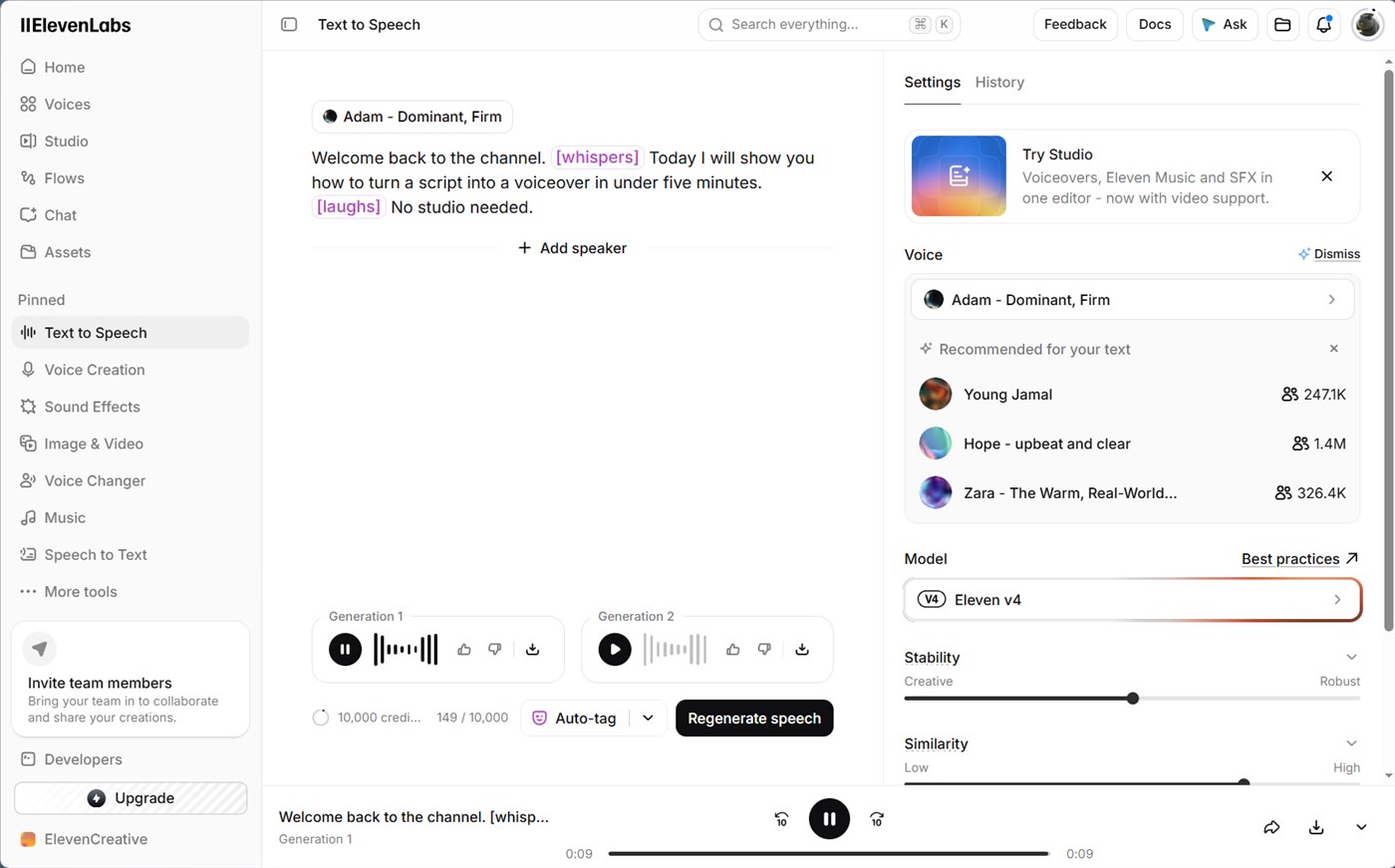
- Click Generate speech, then play and download from the generation cards.
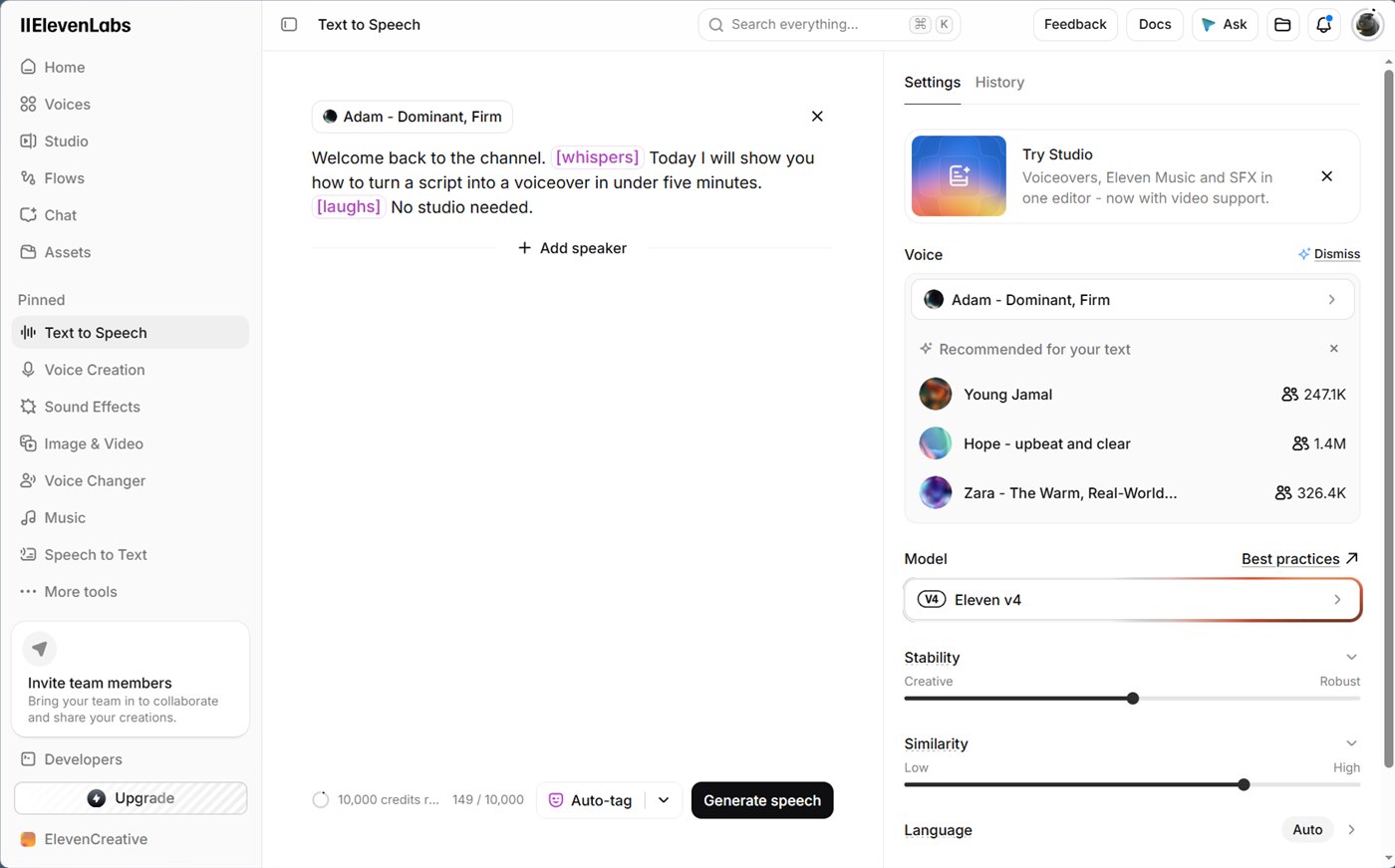
The script I used carried two audio tags, [whispers] and [laughs], written in square brackets inside the sentence. The editor highlights them in purple once v4 or v3 is selected. Tags steer delivery for the words that follow, so place them where a human narrator would change tone. The Auto-tag button next to Generate asks the tool to insert tags for you, which is a useful first draft to edit by hand.
Play the sample below to hear a short line generated with the Adam voice and a [whispers] tag. It is a single generation, so it shows what a tag does, not how every voice behaves.
The Model row opens a picker with the three main options:
One click on Generate returned two takes of the same script, shown as Generation 1 and Generation 2 with thumbs up, thumbs down and download buttons. The button then switches to Regenerate speech.
To save credits:
- Proofread first, and do it for free: paste the script into a free chat tool such as ChatGPT or Gemini and ask it to fix spelling only. The model reads text as typed, so a typo becomes a mispronounced word, and every regeneration to fix one costs credits.
- Write numbers and symbols out in words when they matter ("twenty twenty-six" instead of "2026").
- Audition on a short passage, then paste the full script once the voice and tags work.
- ElevenLabs documents two free regenerations in the web app when the text, voice and model stay unchanged, the first generation is under two hours old and the page has not been refreshed. Refreshing the tab forfeits them.
- For scripts beyond one generation, move to Studio, which handles long-form narration and the timeline.
Listen to both takes before picking one, since the script alone does not show whether a tag changed the delivery.
Turn audio or video into a transcript (Speech to Text)
Goal: get a timestamped transcript from audio or video.
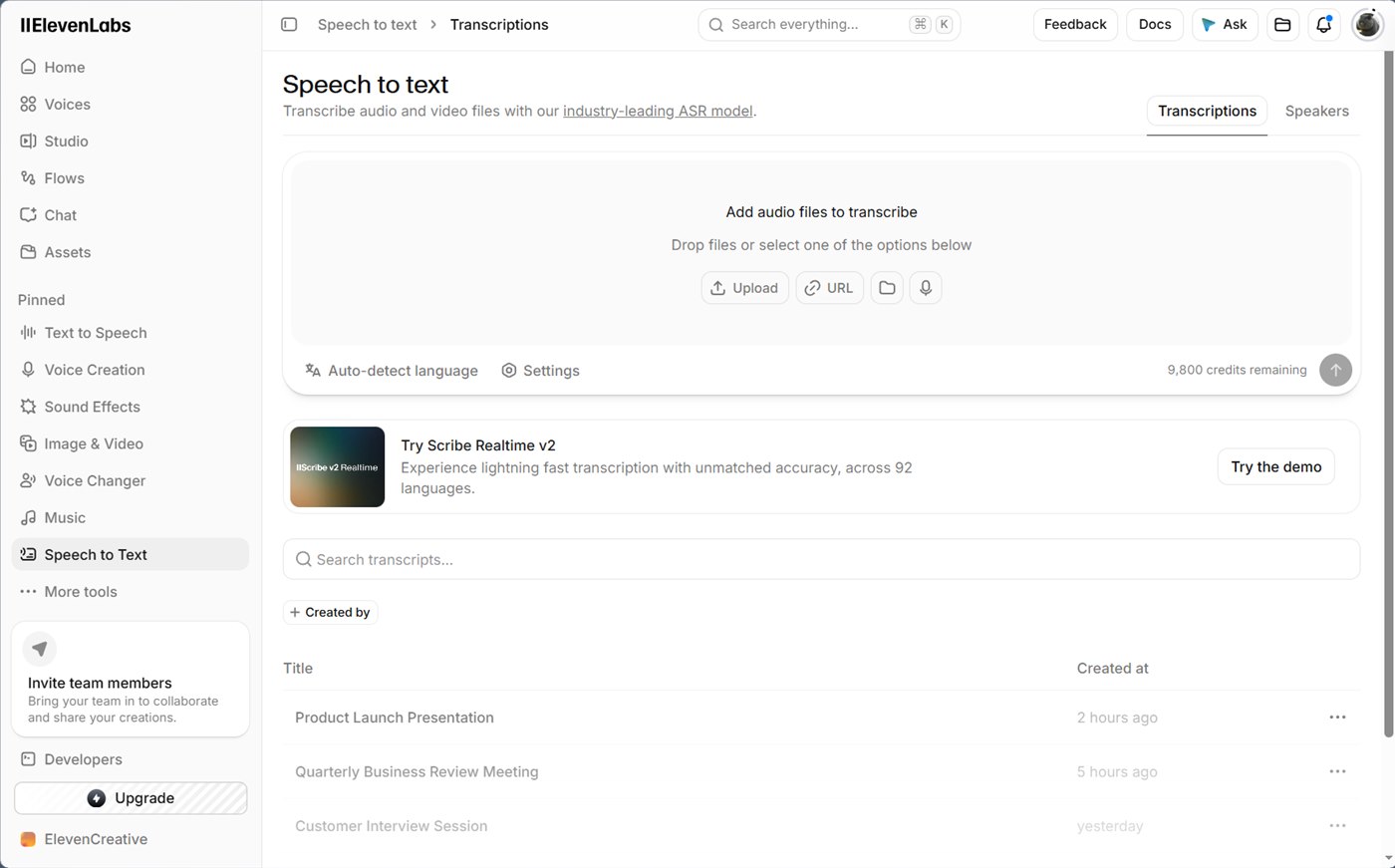
- Open Speech to Text. The page is the Scribe interface, and it advertises Scribe Realtime v2 across 92 languages.
- Drop a file, or choose Upload, URL, the folder icon for existing assets, or the microphone to record.
- Leave Auto-detect language on, or pick one.
- Open Settings to tune the output.
The settings panel has five controls:
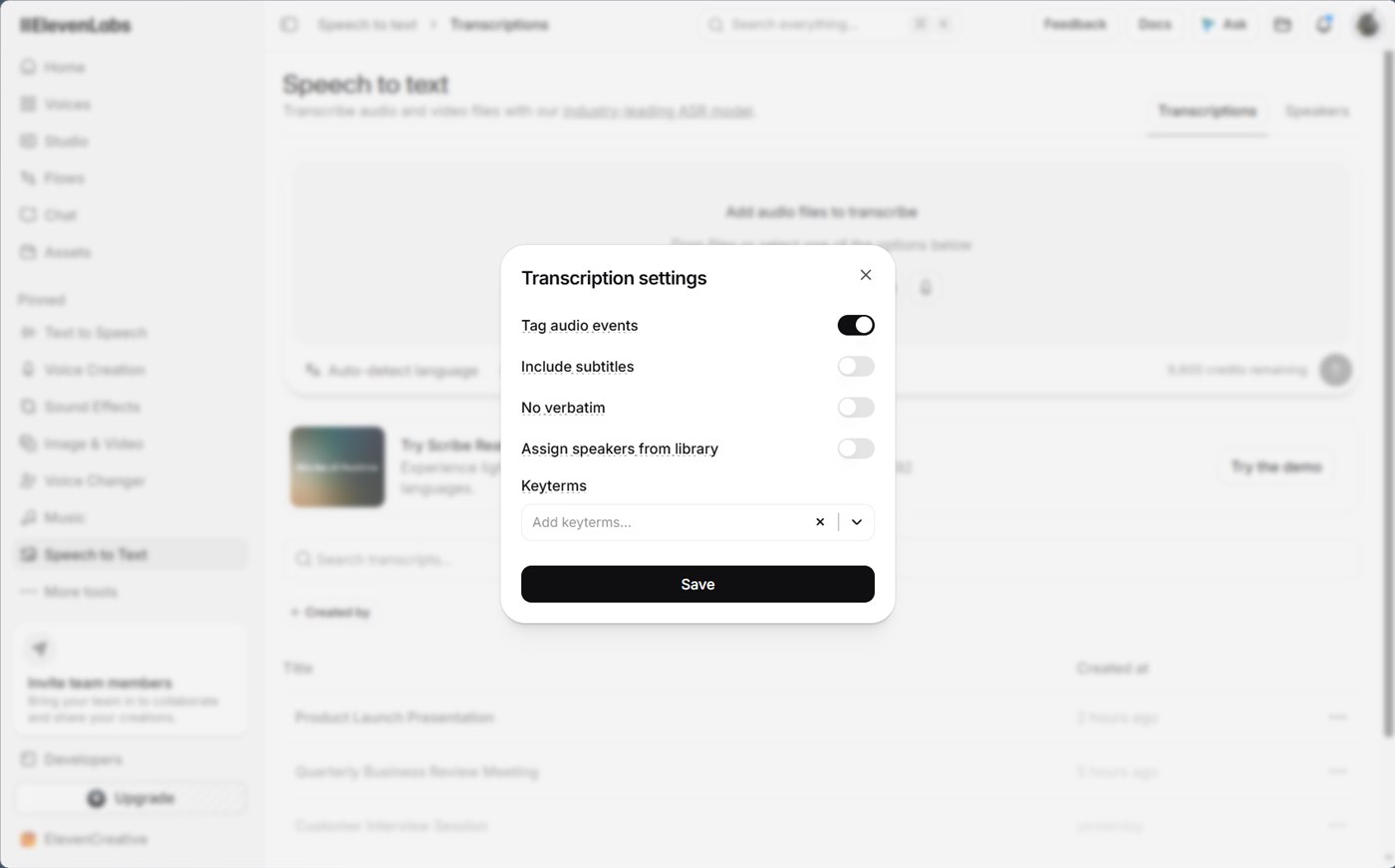
- Tag audio events is on by default and marks sounds such as laughter in the transcript.
- Include subtitles initializes the project with a subtitle track you can edit, which suits video work.
- No verbatim removes filler words and false starts.
- Assign speakers from library matches speakers to voices you saved.
- Keyterms accepts product names and jargon so the model spells them correctly. The documentation notes an extra cost for keyterm prompting.
The documentation rates Vietnamese in the "Excellent" tier for Scribe v2, meaning word error rates of 5% or lower. That is the vendor's own measure, and a ten-minute test on your own recordings is the faster way to find out how it handles your accent and audio quality. I opened the screen and settings but did not run a transcription.
Narrate a long script or assemble a video (Studio)
Goal: narrate something longer than one Text to Speech generation, such as an audiobook chapter, a podcast episode or a video with voiceover, music and captions in one place.
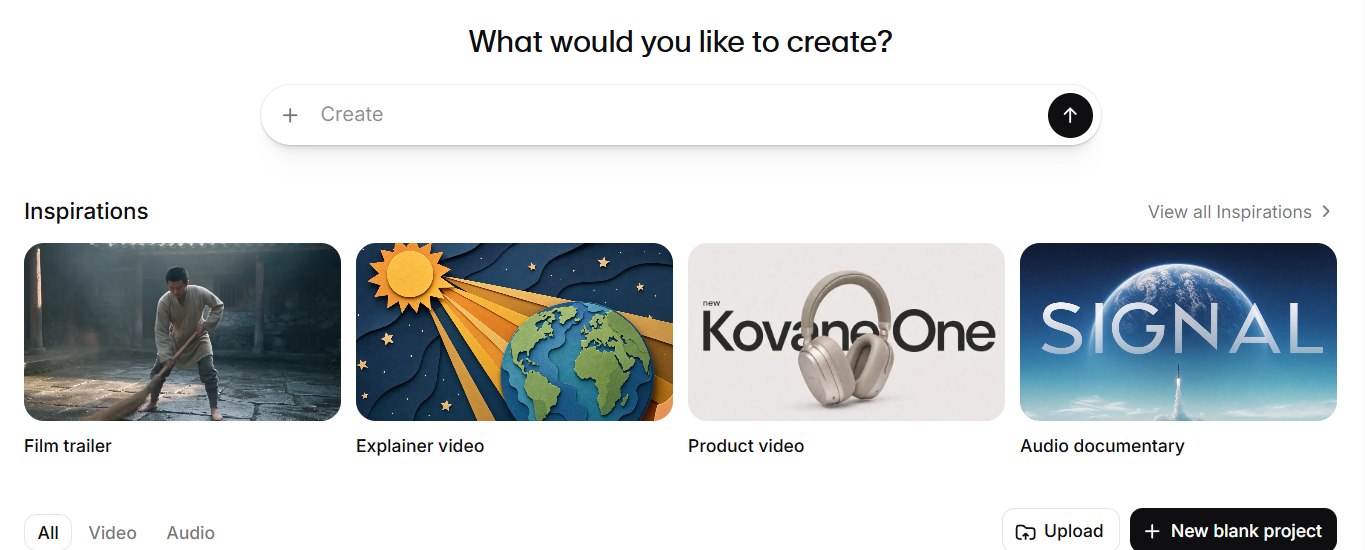
Studio is the multi-track editor in the sidebar. On 2026-10-21 its start page asks "What would you like to create?" and offers five ways in:
- Type a description into the Create bar. The documentation says Studio 4.0 is prompt-first: you describe the project and the Studio Agent builds a first draft.
- Click the plus icon in the Create bar to attach a file such as a script.
- Pick an Inspiration, which is a starter template.
- Click Upload to start from your own document or media.
- Click New blank project to start empty.
View all Inspirations opens the full list of seven templates: Film trailer, Explainer video, Product video, Audio documentary, How to tutorial, Audio podcast and Captions.
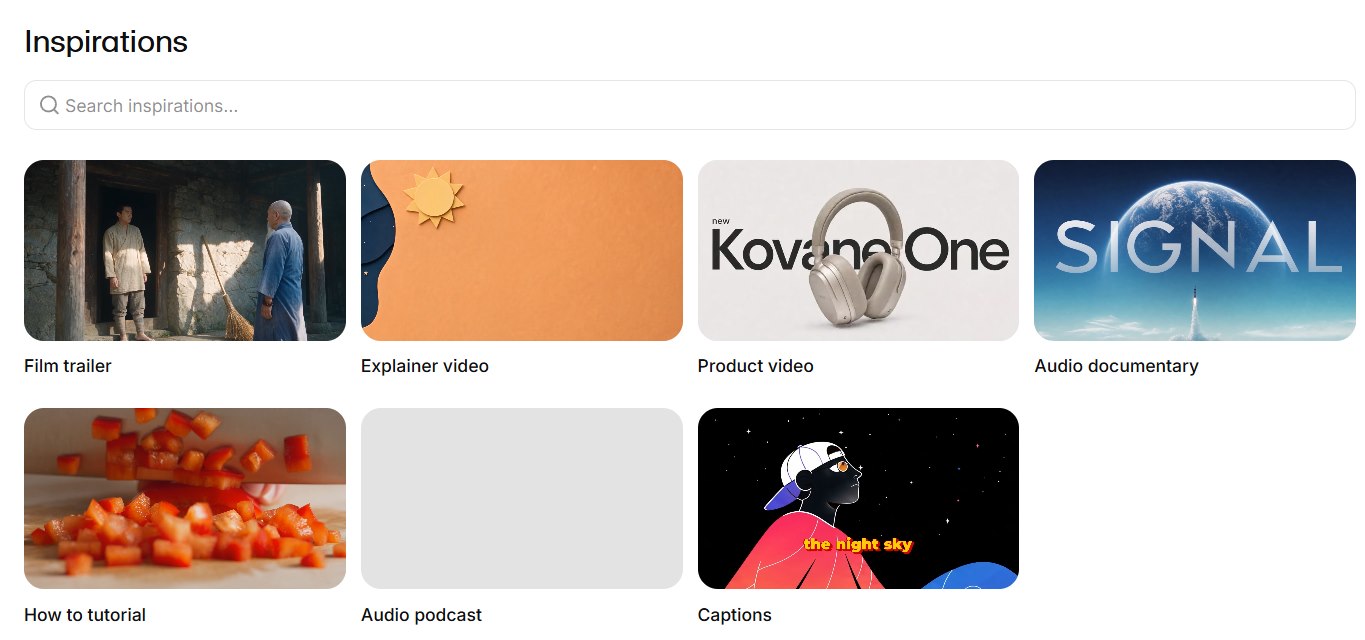
Below the templates, the All, Video and Audio tabs filter your recent projects, with a search box and list or grid views.
The documentation describes two project types. Audio projects suit long-form narration, podcasts and audiobooks, and video projects combine clips, images, speech, music, sound effects and captions. The features that matter for a long narration are:
- A multi-track timeline with trim, split and duplicate.
- A chapters sidebar for audio projects. Chapters are detected automatically when you import a document that has them, with limits of 500 chapters per project, 400 paragraphs per chapter and 5,000 characters per paragraph.
- A different voice per section, with a color marker for each voice and a "Replace voice across project" command.
- A Pronunciations Editor for alias or phoneme rules. Phoneme tags work only with Eleven Flash v2.
- Generation history, paragraph locking and "Insert break" pauses of up to 3 seconds.
Cost and plan limits from the same documentation: Studio is available on the free plan, which allows 5 projects and puts a watermark on video exports. Narration costs credits, and playing existing audio is free. Each paragraph gets up to two free regenerations if its text, voice and voice settings stay the same. Export costs credits only for paragraphs not yet converted. Free, Starter and Creator plans export 128 kbps MP3. Agent chat in Studio uses credits by token usage, and generated media is billed separately.
I opened the start page and the template list but did not create a project, so I cannot tell you what a generated first draft looks like or what it costs.
Generate sound effects from a text prompt
Goal: generate a short effect, such as keyboard typing under a screen recording.
- Open Sound Effects. The Explore tab shows a browsable library by category (Animals, Bass, Booms, Brass, Cymbals and more).
- Click the prompt bar at the bottom and describe the sound: "Mechanical keyboard typing in a quiet office, close up."
- Set the options on the prompt bar: loop (off by default), duration (Auto by default) and prompt influence (30% by default). Higher influence follows the text more literally, lower influence gives the model more room.
- Click Generate sound effect.
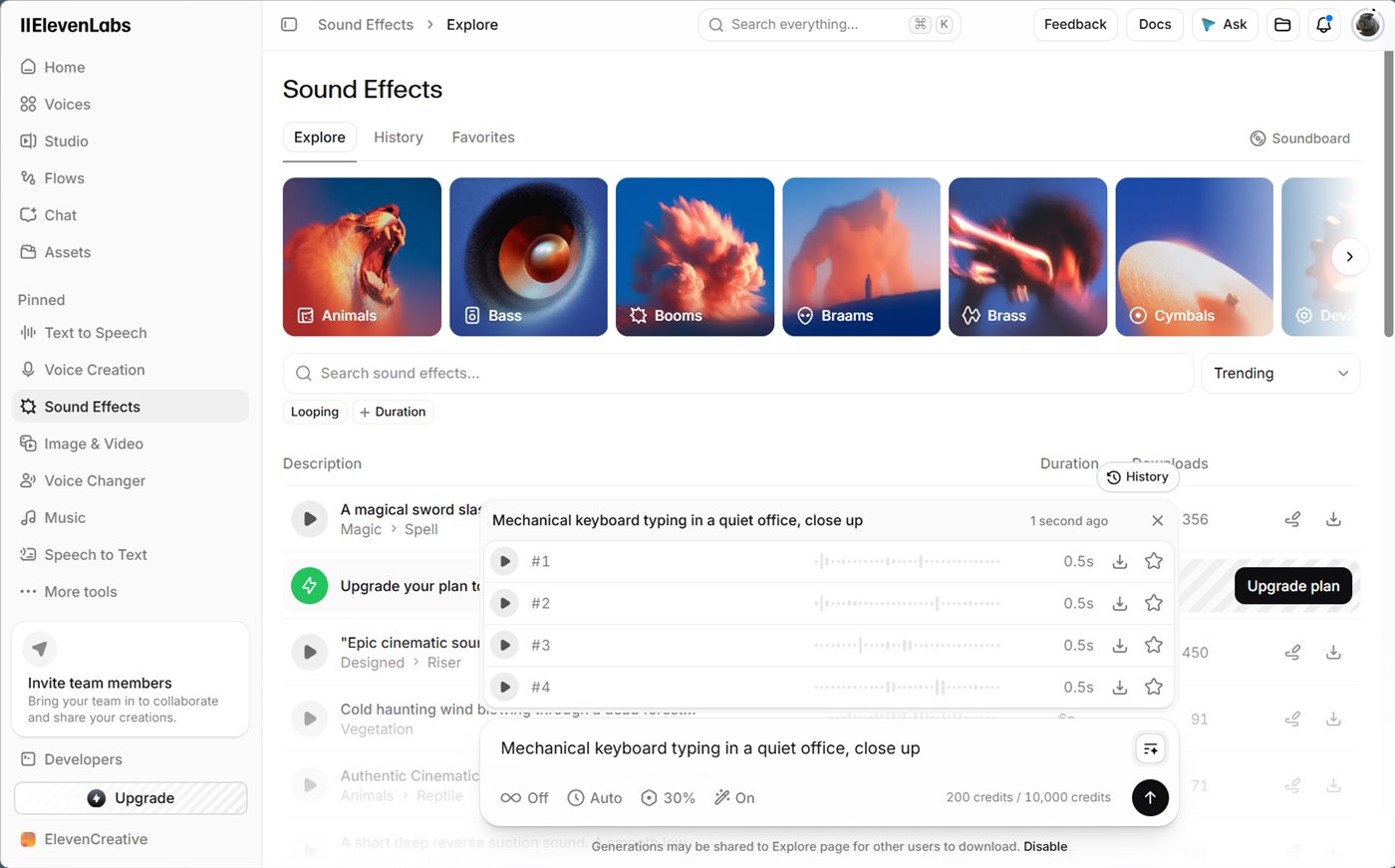
The result was four variants, each with play, download and favorite buttons. With duration on Auto, the model returned 0.5-second clips for my typing prompt, which is too short to lay under a screen recording. Set the duration explicitly when you need a bed of sound. The documentation gives the range as 0.1 to 30 seconds, and a fixed duration costs 40 credits per second, so a 10-second effect is 400 credits.
The page also shows two notices that are easy to miss:
- At the bottom of the page, the free plan shows the notice "Generations may be shared to Explore page for other users to download", with a Disable link. Treat free-plan prompts as public.
- Library items in the Explore list displayed "Upgrade your plan to download sound effects" for me. Check whether your own generated clips download on your plan before planning a project around them.
Generate background music
The Music page generates tracks from a prompt, with a marketplace of existing tracks filterable by genre, instrument and mood.
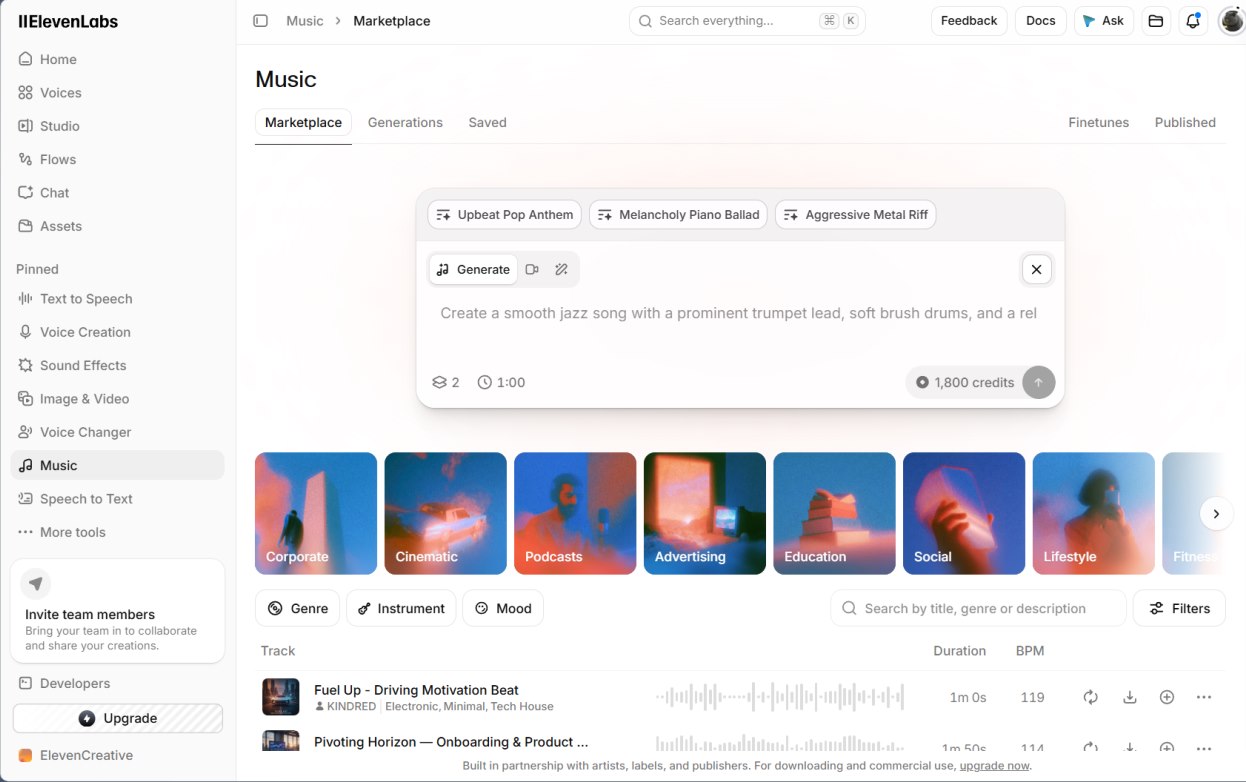
The prompt bar shows the cost before you click: 1,800 credits for two one-minute tracks, which is about a fifth of the free allowance per generation. The footer reads "For downloading and commercial use, upgrade now", so the free plan is for auditioning. I did not generate a track.
Create or clone a voice for your channel
Goal: a consistent narrator voice instead of a stock one.
Open Voice Creation. The page offers four routes, side by side:
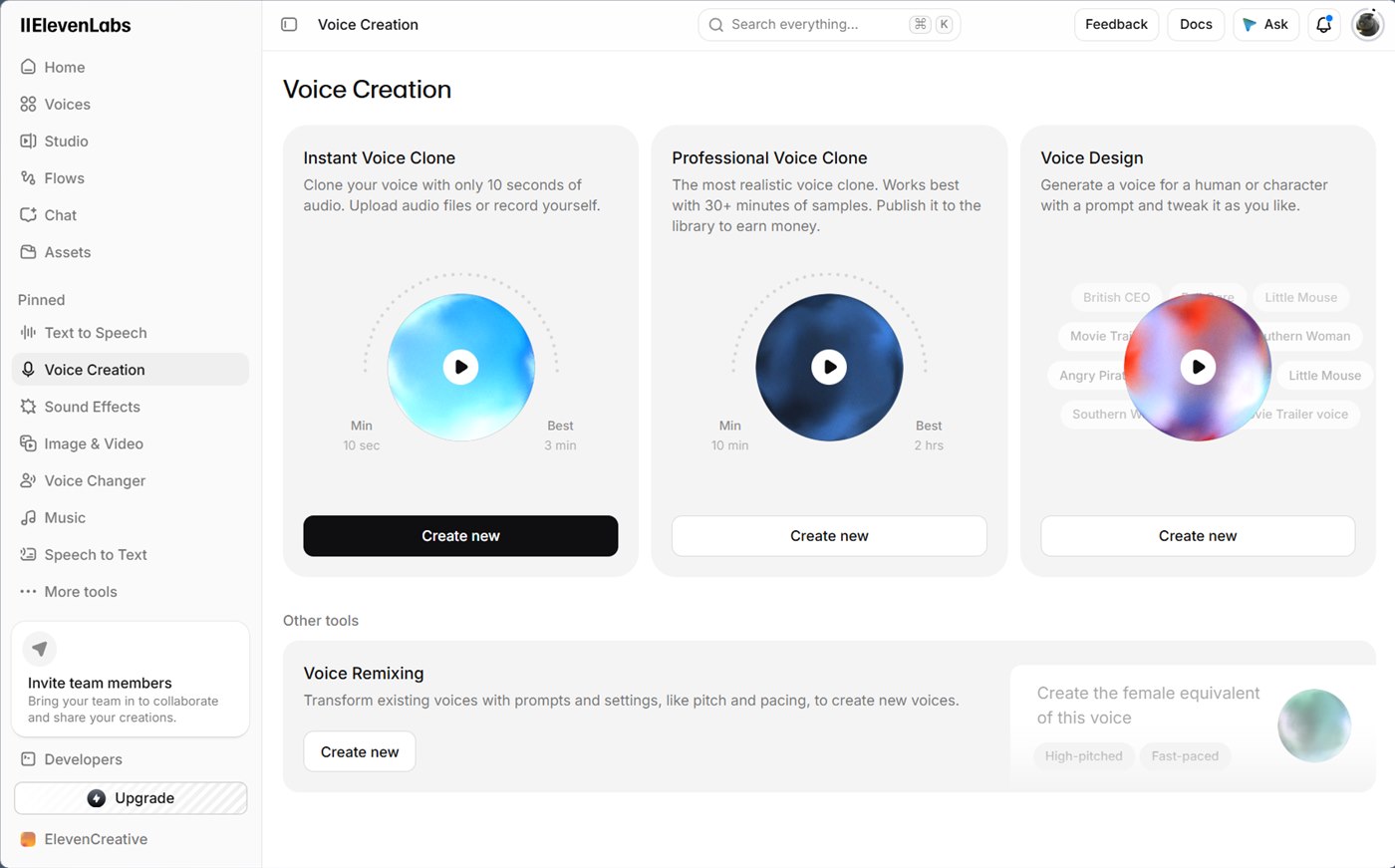
| Route | Input it asks for | Best when |
|---|---|---|
| Instant Voice Clone | 10 seconds minimum, best at around 3 minutes | You want your own voice quickly |
| Professional Voice Clone | 10 minutes minimum, best at up to 2 hours, "works best with 30+ minutes" | You need the closest match for long-term production |
| Voice Design | A text prompt | You want a new voice with no recording |
| Voice Remixing | An existing voice plus a prompt | You like a voice but want a different pitch or pace |
I tried Voice Design, the only route that needs no recording. The dialog opens with a prompt box and example chips. Write the prompt like a casting brief: gender, age, accent, audio quality, pace and intended use. The same habit of stating the job, the constraints and the format applies here as in modern prompt engineering. My prompt was:
A warm, calm female narrator in her thirties with a neutral American accent. Clear studio-quality audio. Friendly, unhurried pace, suited for tutorial videos and podcast intros.
Click Generate voice and the dialog returns three candidates: Voice 1, 2 and 3.
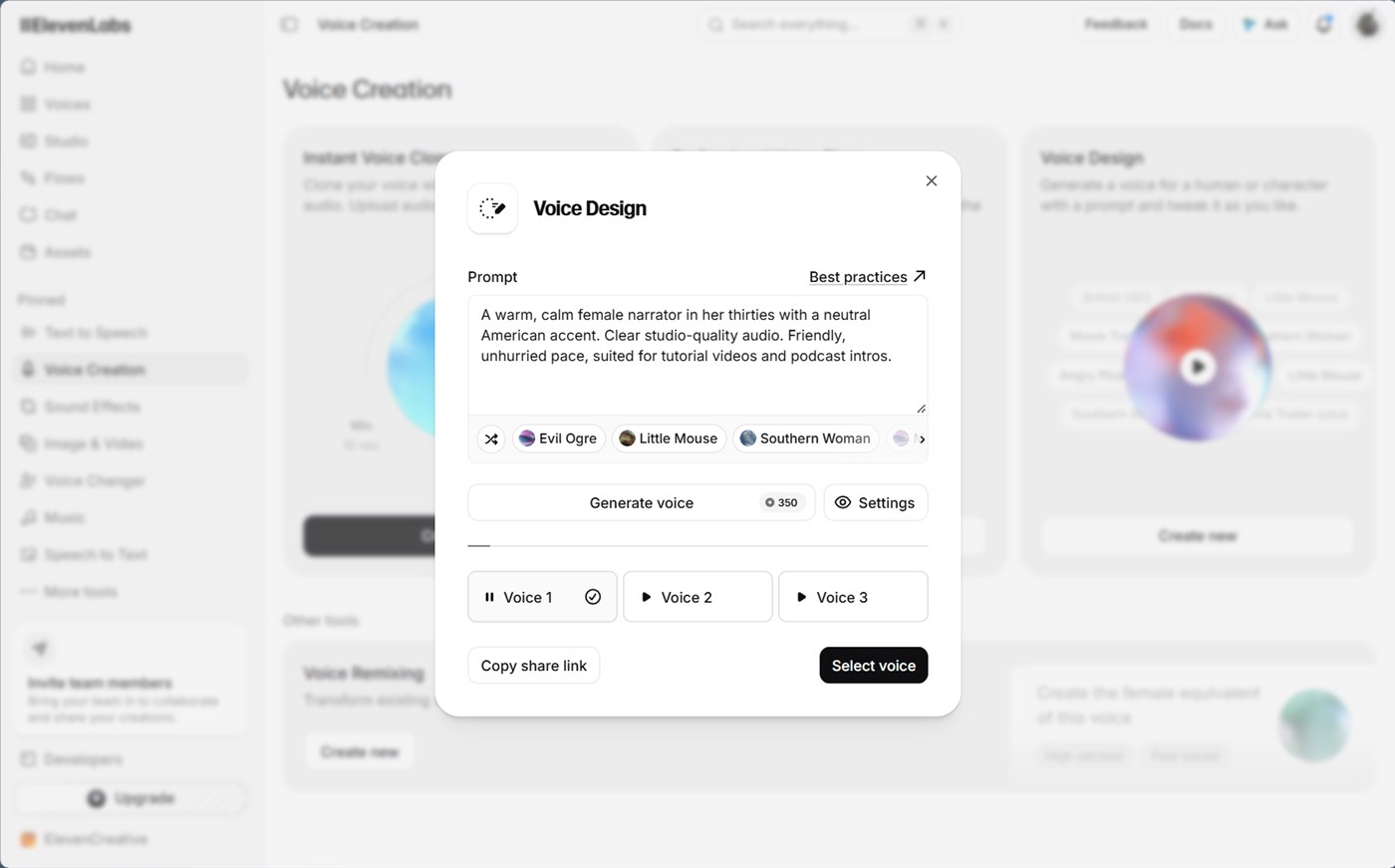
You pay once for the preview text, then compare the three candidates freely. Select voice saves one into your library and consumes a voice slot, so I stopped before that step.
Before you clone a voice, check three consent rules:
- Instant Voice Clone asks you to affirm that you have the right to the voice and consent from the speaker.
- Professional Voice Clone requires voice verification and works only for your own voice.
- ElevenLabs' use policy prohibits copying a living person's voice without explicit consent, recordings of anyone under 18, and impersonation or fraud.
Dub a video into another language
Goal: publish the same video for a second audience without re-recording.
- Open Dubbing (under More tools, or open
app/dubbingdirectly). - Add the source with Select files, or use the globe icon to paste a video URL.
- Check the model chip. The current default is v2, labelled alpha on the intro card. It lists 92 languages and promises to preserve the emotion and delivery of the original speaker, adapt phrasing so it sounds natural, and clone the speaker's voice automatically.
- Click Choose languages and search for the target.
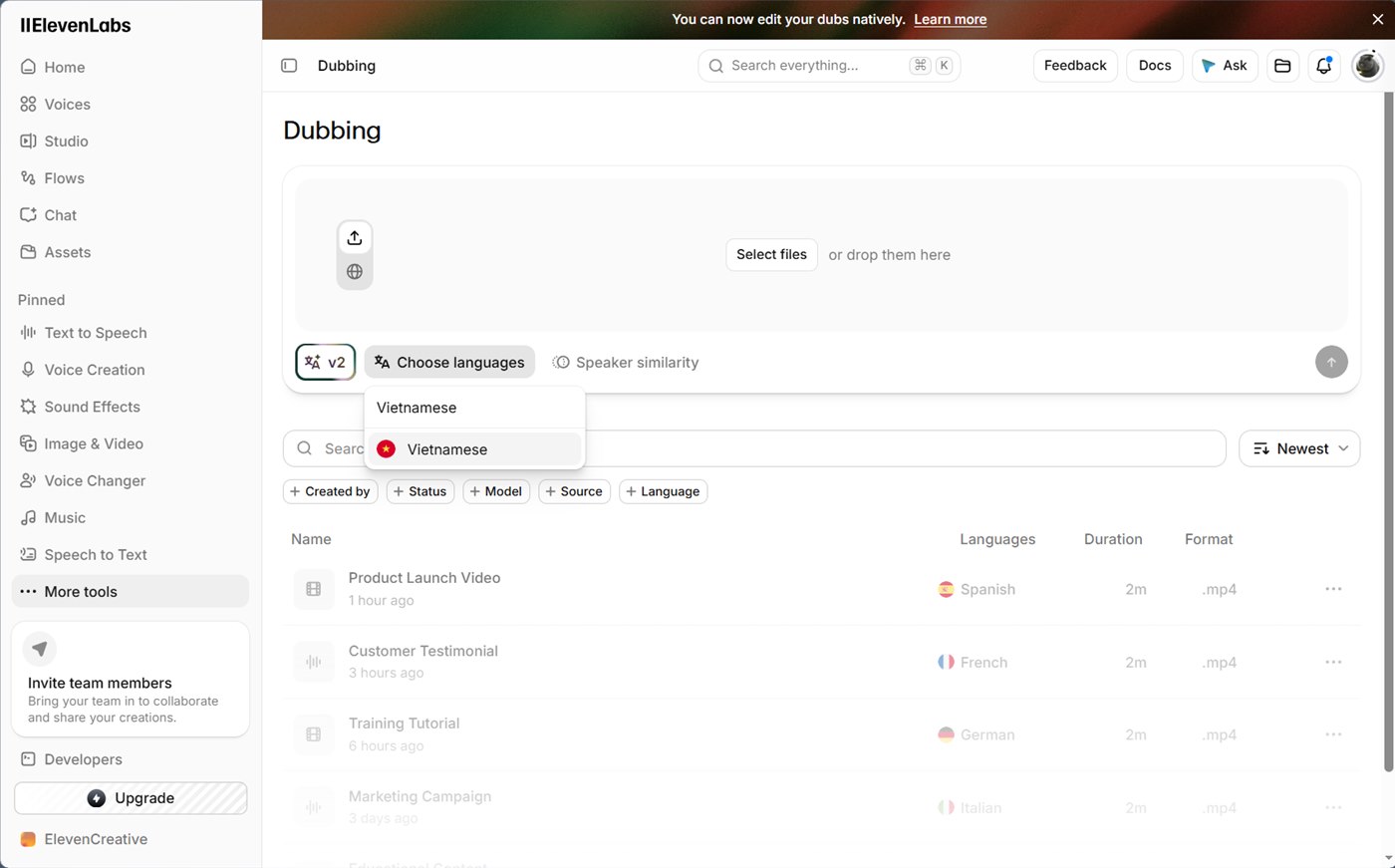
- Open Speaker similarity and set the slider. The panel explains the trade-off: higher values preserve the source accent, lower values sound more natural in the target language.
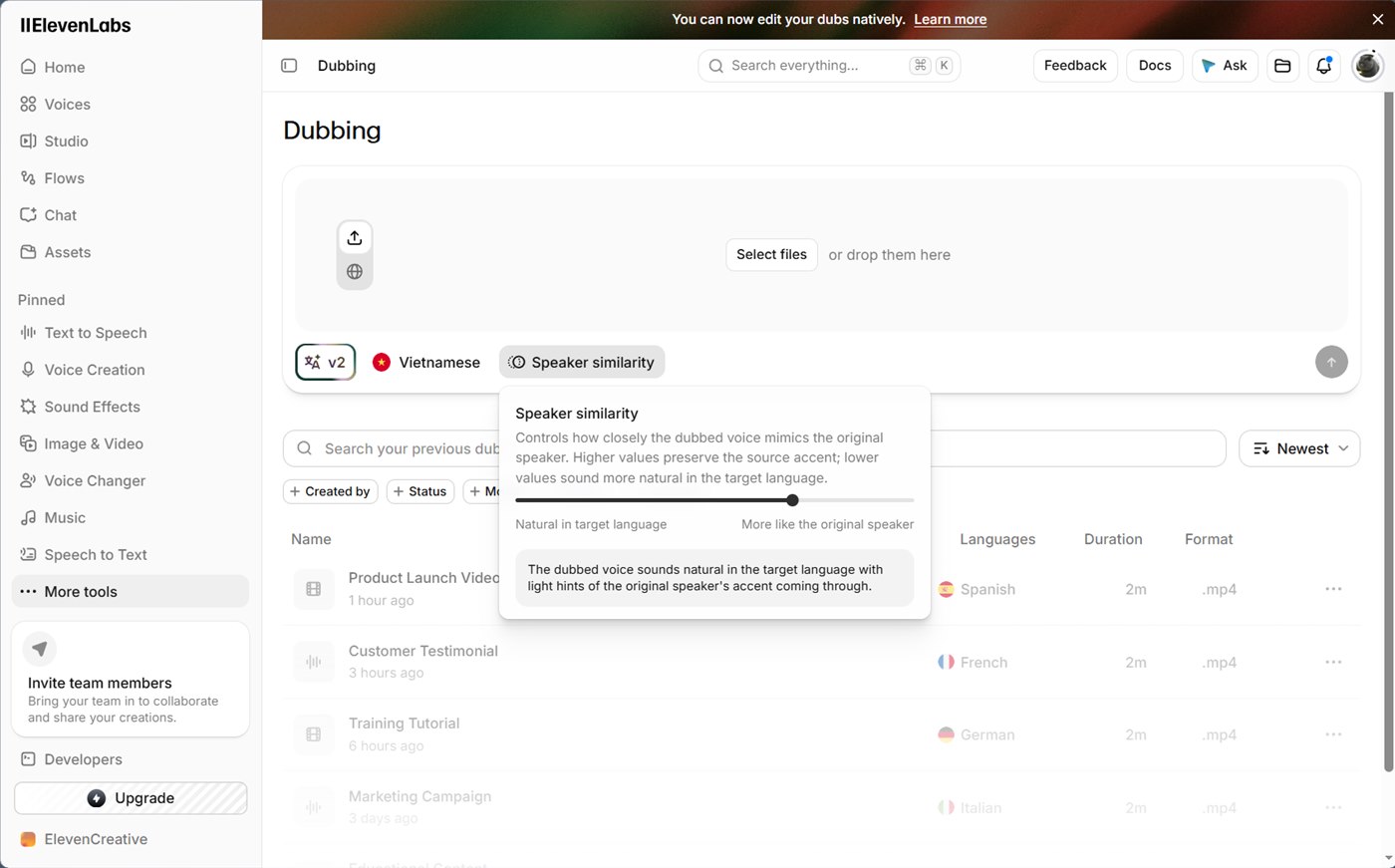
- Submit with the arrow button, then review the transcript and dubbed track before publishing.
I did not submit the job, so there is no finished dub here. The documentation and pricing page give the numbers that set the cost. Cost is charged per minute of source media for each target language, and the app shows the total before the job starts. A watermarked automatic dub costs 2,000 credits per minute and an unwatermarked one 3,000, so the free 10,000 credits cover five source minutes into one language with a watermark. The app accepts files up to 1 GB or 180 minutes and up to 32 speakers.
Vietnamese is supported in both generations of dubbing. Read the translated transcript before you export. Names, product terms and numbers go wrong first in machine dubs.
Build a voice agent that answers the phone
Goal: an agent that answers common questions, takes messages and routes calls for a small business.
Switch to the Agents platform from the platform switcher in the sidebar. The first screen is a template browser with eight templates, including Customer Support, Language Practice, Front Desk Receptionist, Inbound Lead Qualification, Hotel Reservation and an e-commerce assistant, plus Create Blank Agent.
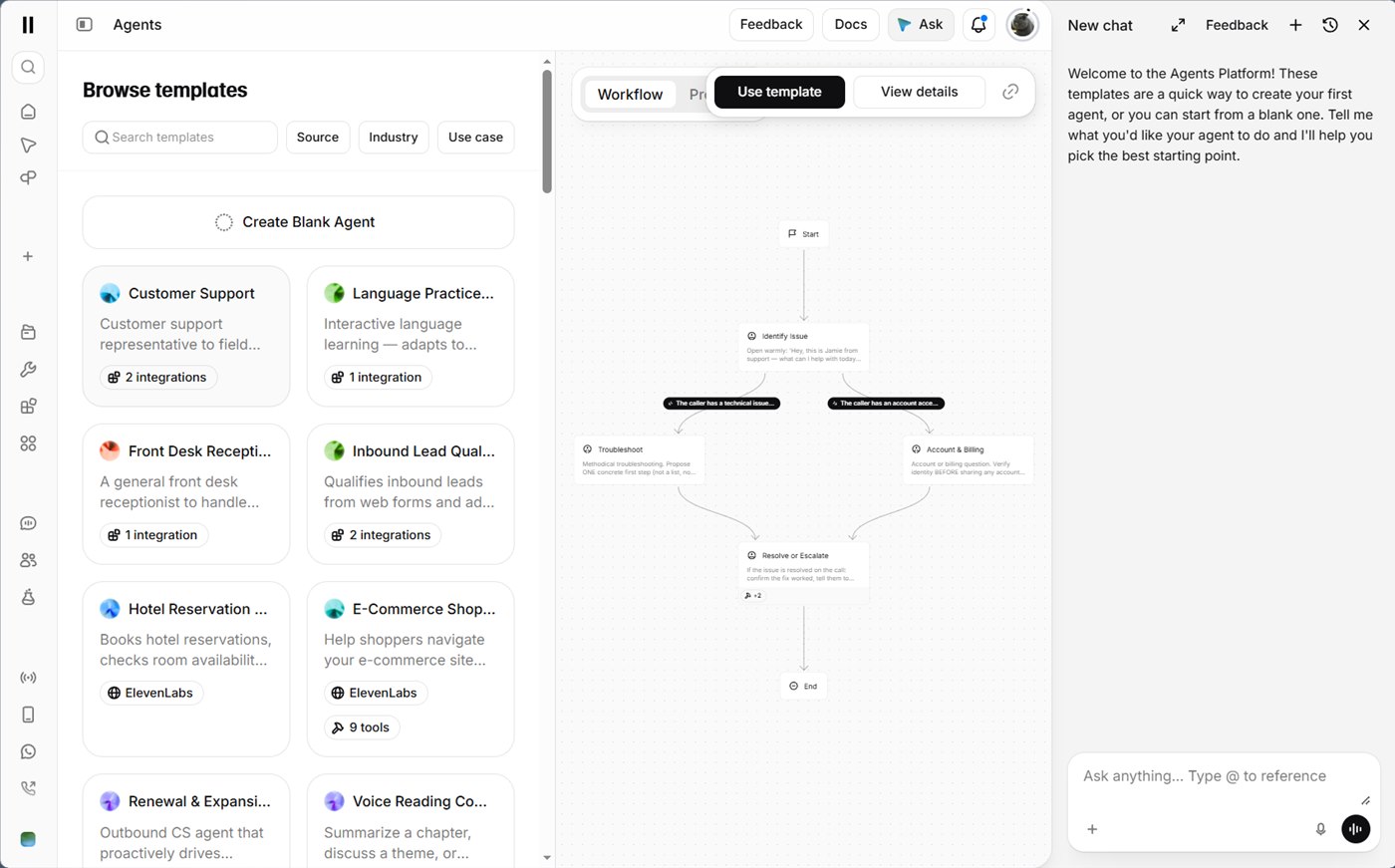
Selecting Front Desk Receptionist previews its workflow without creating anything. The graph runs from a greeting that identifies intent to three branches: answer a frequently asked question, transfer the call, or take a message. The branches converge on a wrap-up step that confirms the action.
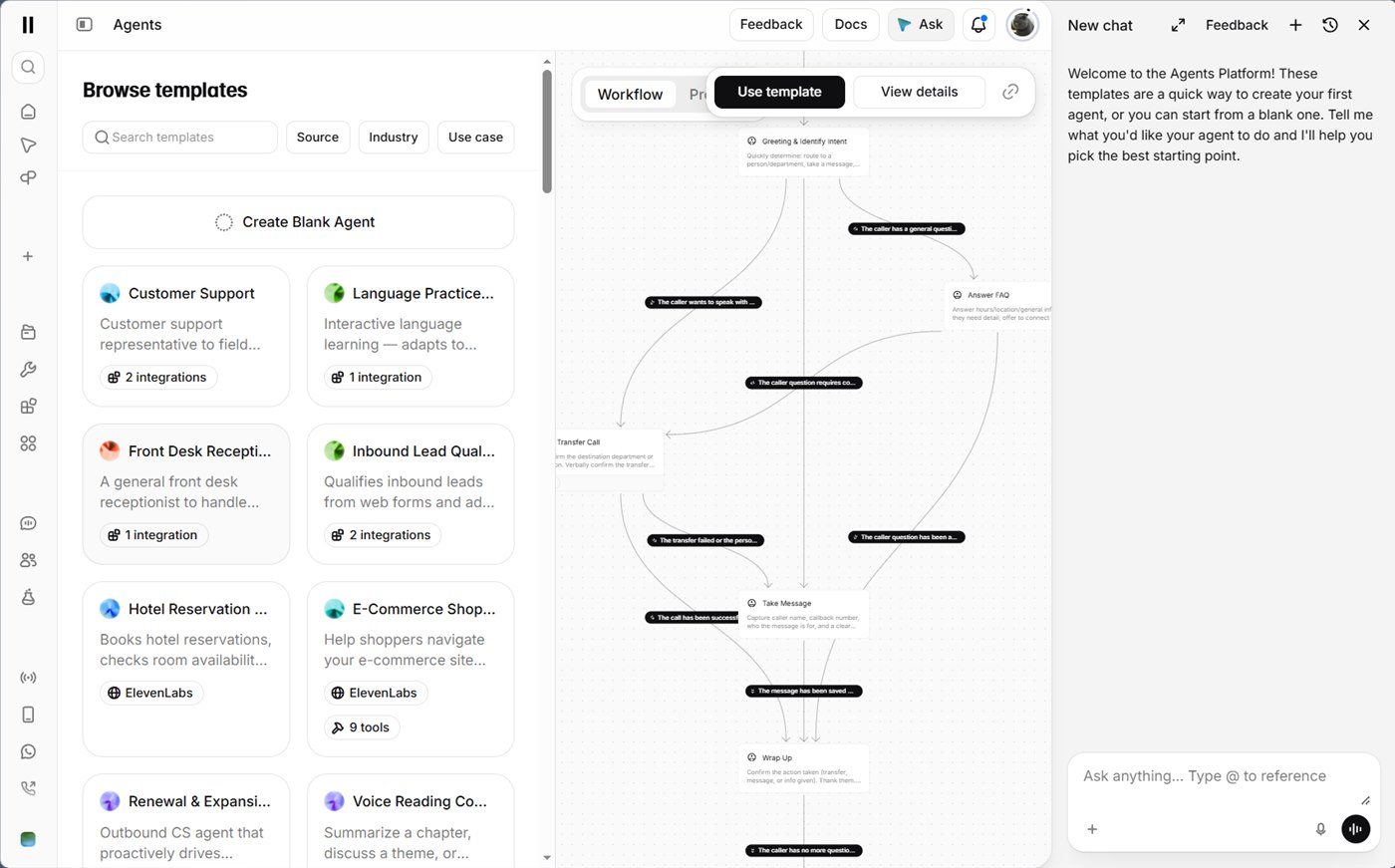
To turn the template into your own agent:
- Click Use template.
- Edit each node's prompt so the greeting, hours and policies match your business.
- Add your content to the knowledge base (documents, text or URLs) so answers come from your material instead of the model's general memory. A short glossary of your product terms helps here, for the reasons covered in why AI agents need a domain glossary.
- Choose the voice and language, then talk to the agent in the dashboard before connecting anything.
- Run the built-in tests against the scenarios you care about, then deploy through the web widget, an SDK, or a phone number.
The editing and deployment steps come from the ElevenAgents documentation, not from my own run, and it says a first agent takes five minutes. Agents bill for every minute they run. The pricing page lists $0.08 per additional minute, with LLM and telephony costs billed on top, and $0.16 per minute above your concurrency limit. Because of that running cost, estimate calls per day before you publish a phone number.
Which feature fits which job
| Job | Feature | Run by me | Cost signal |
|---|---|---|---|
| Narrate a script | Text to Speech (v4) | Yes | Counts characters |
| Long narration or a video project | Studio | Start page only | Credits per generated paragraph |
| Short sound under a clip | Sound Effects | Yes | 200 credits per auto-duration run |
| A consistent narrator | Voice Design | Yes | Price on the button |
| Second-language video | Dubbing (v2 alpha) | Setup only | 2,000 to 3,000 credits per minute |
| Transcript or subtitles | Speech to Text (Scribe) | Setup only | Per audio hour on the API |
| Phone and chat answers | ElevenAgents | Preview only | $0.08 per extra minute |
| Intro track | Music | Setup only | 1,800 credits per two tracks |
When you do not need ElevenLabs yet
For a short voiceover, another free tool may be enough. ElevenLabs is worth paying for when the voice has to sound expressive, or when you need voice cloning, dubbing or the API. The figures below come from each vendor's own page, checked on 2026-10-21. I did not compare audio quality, because that takes listening and this article generated no samples to set side by side.
| Tool | Free allowance | Commercial use | Fits when |
|---|---|---|---|
| CapCut text to speech | The page lists no character cap | The FAQ says yes, subject to CapCut's terms | The voiceover goes straight into a CapCut edit, one export step fewer |
| TTSMaker | 20,000 characters per week, some voices unlimited | The site says lawful commercial use is allowed | Short narration, no account, no emotion control needed |
| Azure AI Speech | 500,000 characters per month on the F0 tier | Read the Azure terms for your case | You are a developer and want a free API |
| Fish Audio | Reported at 8,000 credits per month, 500 characters per generation | Sources disagree, read the current terms | You want to try voice cloning before paying anyone |
| ElevenLabs Free | 10,000 credits per month | No, the free plan requires attribution | You need audio tags, v4, dubbing or Scribe |
To choose quickly:
- Use another free tool if the script is short, the voice only has to be clear and you do not need to shape emotion.
- Choose ElevenLabs if the voice carries the video, as in a story channel, an ad or a character, or if you want voiceover, transcript and dubbing in one place.
- Read the commercial terms of the tool you pick before you publish. Terms change, and the ElevenLabs free plan does not allow commercial use either.
Commercial use, privacy and limits
- According to ElevenLabs' billing documentation, output on the free plan is non-commercial and needs attribution. A commercial license starts at Starter. Check the plan terms before you monetize an asset.
- Free-plan sound-effect generations may appear on a public Explore page, as the notice in the interface says. For confidential scripts, use a paid plan and read the privacy policy. If a script cannot leave your machine at all, a self-hosted model is the safer route, covered in the LM Studio local AI guide.
- The use policy requires disclosing AI interaction where the law requires it, and that includes voice agents answering calls.
- ElevenLabs reports that creator Drew Binsky's dubbed videos averaged 2.6M views against 1.1M for non-dubbed ones, and that Kompf24 cut waiting time from 90 seconds to about 15 with a voice agent. Both are case studies the vendor picked, so expect lower results.
- I did not run a dub, a transcription, a music generation or a deployed agent, and I could not check the v4 credit rate per character in the documentation I could reach. The free-plan download rules for generated sound effects are also untested.
A first week with the free plan
You can create a free ElevenLabs account here. Spend the 10,000 credits in this order. Day one: a 150-character test script in Text to Speech with two tags, then one sound effect with an explicit duration. Day two: a Voice Design brief for your channel's narrator. Day three: preview a dub setup and read the cost line before submitting. After that, decide whether the Starter plan at $6 for 30,000 credits and a commercial license matches your publishing rate.
Sources
- ElevenLabs models overview - languages, character limits and tag support per model.
- Eleven v4 announcement - release on September 28, 2026 and cloning support.
- ElevenLabs pricing - plan prices, credits and per-minute dubbing credit costs.
- Text to Speech documentation - voice settings, audio tags and free regenerations.
- Voice Design documentation - prompt guidance and preview behavior.
- Instant Voice Cloning documentation - sample length and consent.
- Sound Effects documentation - duration range and credit cost per second.
- Dubbing documentation - limits, speakers and supported languages.
- Speech to Text documentation - Scribe languages and features.
- ElevenAgents overview - knowledge base, tests and deployment options.
- ElevenAgents pricing - per-minute pricing.
- ElevenLabs prohibited use policy - consent and disclosure rules.
- ElevenLabs billing documentation - free-plan commercial terms.
- Drew Binsky dubbing case study - vendor-reported view counts.
- Kompf24 voice agent case study - vendor-reported waiting time.
- Unite.AI on the v4 launch - independent coverage of v4.
- ElevenLabs Studio documentation - project types, editing features, limits, export quality and credit rules.
- CapCut text to speech - free access, languages and commercial-use FAQ.
- TTSMaker - weekly free allowance and commercial-use statement.
- Azure AI Speech free tier answer - 500,000 free characters per month.
- Fish Audio pricing summary - third-party summary of the free tier, verify on the vendor site.