Hyperframes vs Remotion: Strengths, Community Size and Extensions
Hyperframes renders HTML, Remotion renders React. Compare setup, license, ecosystem size and agent support, with two demo videos made by agents on Windows.
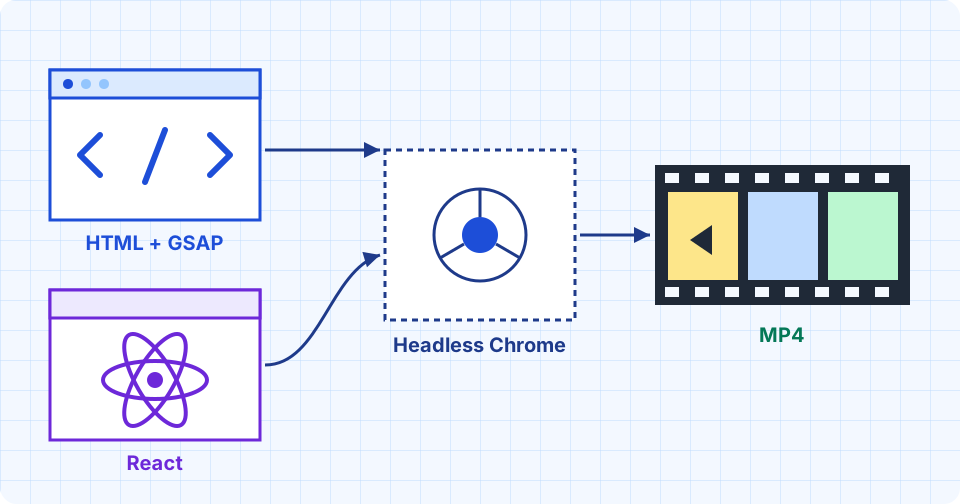
Pick Hyperframes if an AI agent or a non-React team writes the video and you want to render it without a build step (a stage that packs your code before it runs). Pick Remotion if your team already writes React (the popular JavaScript library for building web interfaces), you need large-scale cloud rendering, or you want the larger package ecosystem. Both render video by driving headless Chrome (a Chrome browser with no visible window) frame by frame, so they differ in authoring language, license and ecosystem size.
What Is Each Tool?
Hyperframes is an open-source framework from HeyGen, published under Apache 2.0. A video is an HTML file: data attributes set timing and tracks, and animation comes from CSS or JavaScript animation libraries such as GSAP. The renderer steps through each frame in Chrome and assembles them into a video with FFmpeg, a free video tool. It needs Node.js 22 or newer and FFmpeg.
Remotion has existed since June 2020. A video is a React component: code that works out what to draw from the current frame number. Its license is custom and free for teams of up to three people (see License and Cost).
The Same Brief, Two Agents
I gave two Claude subagents one brief: "Make a short video that introduces UtilKits, a blog with guides on LLMs, AI tools, agents and MCP. Make it look like something a good motion designer would ship, not a template." One had to use Remotion and the other Hyperframes. Both got the same fixed limits (15.0 seconds, 1080p, 30 fps, no audio, permission to copy the site's logo) and read the same motion-design skill first (a set of craft rules plus check scripts, one of them look.py). Content, style and concept were theirs to choose. I set no model or effort level, so they ran on the session's model (Sonnet 5.5) at its default effort. Runs were on Windows 10 with Node 24.14 on 15 November 2026, using Hyperframes 0.9.52 and Remotion 4.0.543.
Remotion agent, 15 s. Its guide titles are invented.
Hyperframes agent, 15 s. Its post titles come from real UtilKits articles.
I scored both files the same way. Rows marked "self-reported" come from the agent's own log.
| Check | Remotion | Hyperframes |
|---|---|---|
| Spec (15.0 s, 1920x1080, 30 fps, no audio) | pass | pass |
look.py check: valid file, no empty frame |
pass | pass |
| Picture unchanged at the end (skill's limit 1.4 s) | 1.37 s | 0 s, ends mid-motion |
| Motion, mean brightness change per frame (skill's median for human-made films: 6.8) | 1.4 / 255 | 1.8 / 255 |
| My reading of 16 frames: text collisions that hurt reading | 0 | 4 |
| Text clipped mid-reveal | 3 | 1 |
| Frames with over half the picture empty | 2 | 1 |
| File size | 7.0 MB | 13.3 MB |
| Tokens (units of text an AI model reads and writes; all agent work) | 132,037 | 168,998 |
| Tokens per second of video | about 8,800 | about 11,300 |
| Tool calls and wall-clock time | 24, 6.7 min | 28, 9.5 min |
| Authored code | 543 lines, 16.8 KB (three source files plus config) | 147 lines of HTML, 10.9 KB |
| Install footprint | 764 MB node_modules (where npm stores libraries) |
none, since npx fetches the tool on demand (project 1.2 MB with the skill runtime copied in) |
| Render time, three runs I timed | 21.6 to 22.3 s | 32.6 to 33.4 s |
| Render and inspect rounds (self-reported) | 3 half-scale drafts, then final | about 5, including a failed check |
Both videos sit below the skill's human-made band for motion. My frame counts come from one 16-frame sheet and are a judgment call, so a different reader may count differently. Both agents landed on nearly the same idea, taken from the logo: noise funnels into a bar and comes out sorted. Two caveats apply. The skill's runtime and gate scripts target HTML and GSAP, so the Hyperframes agent could use its runtime and the Remotion agent only its guidance (neither ran the gates; I did). The Remotion agent wrote its guide titles itself, while the Hyperframes agent read real ones from the repository. Each tool was run once.
The agents hit different problems. Remotion has no built-in check for overlapping text or timing, so its agent pulled still frames out of the video with a separate tool (ffmpeg) to inspect them, and wrote its own code to time when each element appears. Hyperframes has two commands for this: check scans the project for mistakes before rendering, and snapshot saves a few still pictures so you can see the result without making the whole video. Its catch is that mistakes can fail silently. In an earlier round, a typo in the video code still produced a finished file, but every frame was identical, and the only hint was an error line in the log. Running check first avoids this.
Where Does Hyperframes Win?
HeyGen's own comparison page lists the main advantages. The Hyperframes agent confirmed the setup one (no install beyond npx, no bundler); the rest is HeyGen's claim, which I did not test. Existing web work (a prototype, a GSAP animation, a Lottie file) goes in nearly as it is, while Remotion needs it rewritten as React components. There is no bundling step, and a human can open the same file in a browser to edit it. The project also ships agent skills for Claude Code, Codex, Cursor, Gemini CLI and Copilot, so an agent can write a valid composition from a prompt.
The same page admits the costs. Compositions must follow rules, such as a paused timeline, no wall-clock time and no unseeded randomness, and breaking them fails quietly. Its Remotion migration skill declines useState and useEffect state machines and third-party React UI libraries.
Where Does Remotion Win?
HeyGen's page says Remotion's frame-as-function model has fewer ways to go subtly wrong, and a React team can reuse its components and design system as they are. Its cloud path is the more mature one: Hyperframes' own page concedes that Remotion Lambda (rendering on Amazon's AWS Lambda cloud service) is ahead. Remotion also has a Player for embedding video in a web app, and 23 starter templates (20 free, 3 paid), including Next.js, a render server, TikTok and Prompt to Video.
Remotion documents agent skills too, so both projects now target agents. For how skills get distributed, see Are agent skills the new npm.
Community and Extensions
| Measure (14 to 15 Nov 2026) | Hyperframes | Remotion |
|---|---|---|
| GitHub stars | 84,204 | 73,134 |
| Repository created | March 2026 | June 2020 |
| Contributors | 142 | 397 |
| npm downloads, last 7 days (main package) | 1.28 M (hyperframes) |
3.64 M (remotion) |
| npm packages tagged with the keyword | 76 | 437 |
| Ready-made building blocks | 448 catalog items (210 blocks, 238 components) | 23 templates, plus @remotion/* packages |
| Latest release | 0.9.52, 15 Nov 2026 | 4.0.543, 11 Nov 2026 |
Stars show attention, and Hyperframes collected its stars in eight months. Downloads and contributors show the more established side: Remotion has about 2.8 times the weekly downloads, nearly three times the contributors, and almost six times the keyword-tagged packages, because it has had six years of third-party work. Hyperframes counters with a registry that installs ready-made transitions, captions, charts and mock UI directly into a composition (npx hyperframes add), plus plugins for five coding agents.
License and Cost
Hyperframes is Apache 2.0, with no seat or render fee. Remotion is free for individuals and companies of up to three people. Larger companies pay under its Company License: $25 per seat per month for manual work (Remotion for Creators), or $0.01 per render in blocks of 1,000 with a $100 monthly minimum for automated rendering. Enterprise starts at $500 per month. If your team has four or more people, the license is a real line item, so read the current Remotion pricing page before committing.
Which One Should You Choose?
- Agent-generated videos, HTML or GSAP assets, no React: Hyperframes.
- A React team, an embedded video editor, or a product that renders thousands of videos on Lambda: Remotion.
- Both fit: start with the one whose license and tooling your team already accepts, and render one clip of your own in each before moving anything. The same habit applies when choosing between coding agents: trial the tool on your own work before switching.
If I had to pick one for my own videos, I would start with Hyperframes. A project that is ready in two seconds with nothing to install, a plain HTML file I can open in a browser, and an Apache 2.0 license with no seat fees fit how I like to work: free, open tools I can try before committing to anything. That is a preference, and no measurement here backs it. If my team already wrote React or needed thousands of renders on Lambda, I would pick Remotion without hesitation.
If your video also needs speech, the ElevenLabs guide covers generating a voiceover you can drop into either project.
Sources
- HyperFrames GitHub repository (stars, release, license, install, skills; read 14 Nov 2026)
- HyperFrames vs Remotion guide (HeyGen, the maker of Hyperframes, so weigh its framing)
- Remotion GitHub repository (stars, release, license; read 14 Nov 2026)
- Remotion license and pricing (free tier, Creators, Automators, Enterprise)
- Remotion templates (23 templates)
- npm registry downloads API and registry search (weekly downloads and keyword counts, read 14 Nov 2026)